
 Ashish Kumar Mehta
Zero-Downtime Migration: SQL Server to GCP using DMS
To perform a zero-downtime SQL Server migration to GCP, utilize the Google Cloud Database Migration Service (DMS) powered by Change Data Capture (CDC). The architectural process involves:
- Preparation: Configure the source SQL Server to Full Recovery Mode for log access.
- Connectivity: Establish a secure tunnel via Cloud VPN or Dedicated Interconnect.
- Schema Conversion: Leverage Gemini in DMS for automated, AI-powered T-SQL conversion.
- Continuous Sync: Initiate the DMS job to replicate transaction logs in real-time with minimal lag.
- Cutover: Promote the destination Cloud SQL instance during a coordinated DNS switch window.
Zero-Downtime SQL Server Migration: Reducing TCO and Business Impact with GCP DMS
For most enterprise organizations, the “Big Bang” migration—where systems are taken offline for hours—is no longer a viable option. In 2026, the cost of unplanned downtime can exceed $10,000 per minute for Tier-1 applications. This technical debt often forces architects into a “migration paralysis,” fearing data inconsistency and transaction loss.
However, migrating SQL Server to GCP has evolved from a risky manual process into a streamlined, Automated Migration Factory approach. By leveraging Google Cloud Database Migration Service (DMS), teams can now achieve a near-zero downtime transition that keeps production databases live until the very moment of cutover. To ensure your Automated Migration Factory remains fiscally sustainable, it is essential to implement deterministic Cloud Cost Management Strategies throughout the migration lifecycle. Post-cutover, organizations must apply Cloud Cost Optimization Strategies: Cloud FinOps Governance & 15 Best Practices to Reduce Cloud Cost to maintain peak database performance without exceeding cloud budgets.
This guide explores the architectural blueprints for a successful move, focusing on high-value requirements like Change Data Capture (CDC) replication, Gemini-powered schema conversion, and secure VPC Service Controls. Whether you are moving to Cloud SQL Enterprise Plus for its 99.99% SLA or optimizing SQL Server licensing via BYOL (Bring Your Own License) model, mastering DMS is the key to a “non-event” migration.
💡 Architect’s Insight: Multi-Cloud Compliance
While migrating to GCP offers unique advantages for scale and data analytics, if your organization is prioritizing specific financial regulatory standards, ensure you review our 2026 Azure SQL Security Strategy: Enterprise Compliance Roadmap to compare hardening frameworks and Zero Trust implementation patterns.
Zero-Downtime SQL Server to GCP Migration: Strategic Roadmap
- 1. Why Zero-Downtime is the Gold Standard
- 2. Pre-Migration: Preparing the Source
- 3. Executing the Migration: Step-by-Step
- 4. Post-Migration: FinOps and Optimization
- 5. Download – The Zero-Downtime SQL Migration Readiness Checklist
- 6. Conclusion: From Legacy to Cloud-Native
- 7. Frequently Asked Question (FAQs)
The Architecture of an Automated Migration Factory
For mission-critical enterprise applications, a traditional SQL Server migration often triggers the fear of extended maintenance windows and data loss. In the current 2026 landscape, even ten minutes of unplanned database downtime can result in significant revenue loss and customer churn. Many organizations remain stuck on legacy infrastructure because the perceived risk of a ‘Big Bang’ cutover outweighs the benefits of cloud modernization.
This is where the GCP Database Migration Service (DMS) transforms the workflow into a streamlined Migration Factory. By utilizing Change Data Capture (CDC) and serverless replication, DMS allows for a continuous data sync from on-premises to Google Cloud SQL. This architect-level approach ensures that your SQL Server on Google Cloud transition is a ‘non-event,’ providing a secure path to Enterprise Plus performance while significantly reducing migration TCO through automated schema conversion and AI-driven validation.
Decoding the SQL Server CDC Engine in GCP DMS
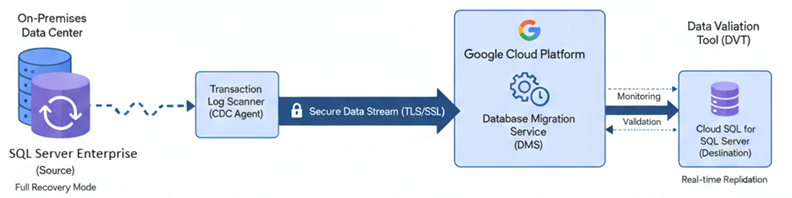
What’s happening: Google Cloud Database Migration Service (DMS) acts as a high-speed relay, continuously scanning the source SQL Server transaction logs via Change Data Capture (CDC) to stream every data mutation (Insert, Update, Delete) to the destination Cloud SQL instance with sub-second latency.
Why Zero-Downtime is the Gold Standard for Modern Migrations
In the 2026 digital economy, “Maintenance Windows” are increasingly viewed as a liability rather than a necessity. As organizations pivot toward global, always-on operations, the ability to move a multi-terabyte SQL Server database without severing active user connections has become a competitive requirement.
The Cost of Downtime: Beyond the Technical Window
When we calculate the impact of an outage during migrating SQL Server to GCP, the financial metrics are staggering. Recent 2026 industry reports indicate that for large enterprises, the median cost of unplanned downtime has reached $23,750 per minute.
However, the “True Cost” extends beyond immediate revenue loss:
- SLA Violations: For SaaS providers and financial institutions, even a 30-minute breach of a Service Level Agreement (SLA) can trigger massive penalty credits and legal scrutiny.
- Data Integrity Erosion: Manual “Big Bang” migrations often lead to split-brain scenarios where transactions are fragmented between the legacy on-premises server and the cloud destination.
- The “Peak Period” Multiplier: If an outage occurs during a high-traffic event—such as a retail holiday or a global financial close—the cost per minute can spike to over $100,000, dwarfing the annual cost of the migration project itself.
How GCP DMS Enables Continuous Data Replication (CDC)
The technical engine behind a “non-event” migration is Change Data Capture (CDC). Unlike traditional bulk-loading methods that require you to freeze the source database, Google Cloud Database Migration Service (DMS) uses a sophisticated, serverless replication stream.
The 2026 DMS Workflow Breakdown:
- Initial Seeding: DMS performs a high-speed parallel snapshot of your source data, moving the bulk of your database to Google Cloud SQL for SQL Server while production remains live.
- Transaction Log Scanning: Once the snapshot is active, the DMS engine begins “sniffing” the SQL Server Transaction Logs. It identifies every individual
INSERT,UPDATE, andDELETE. - The Continuous Stream: These captured changes are converted into a secure data stream and replayed on the destination instance in near real-time.
- Sub-Second Latency: Because DMS is serverless and auto-scaling, it can maintain replication lag in the millisecond range, even under heavy transaction loads. This allows the architect to choose a “promotion” window of seconds rather than hours.
Pre-Migration: Preparing the SQL Server “Migration Source”
Before initiating the DMS migration job, the source environment must be architected for continuous data extraction. Failure to properly configure the source often leads to “Log Sequence Number” (LSN) mismatches, which can derail a zero-downtime migration and force a costly restart.
Enabling Full Recovery Mode and Transaction Log Access
To leverage Change Data Capture (CDC), your source SQL Server Enterprise or Standard instance must treat its transaction logs as a continuous stream rather than a temporary buffer.
- Recovery Model: The database must be set to
FULLrecovery mode. If set toSIMPLE, the transaction logs are truncated immediately after the data is hardened to the disk, leaving no history for GCP DMS to replicate. - The Backup Chain: You must maintain a valid transaction log backup chain. However, there is a delicate balance: if your local backup jobs truncate the logs too aggressively, DMS may lose its “pointer,” resulting in a replication gap.
- Permissions: The migration user requires
VIEW SERVER STATEandVIEW ANY DEFINITIONpermissions to monitor the log-reader agent effectively.
Networking Patterns: Secure Connectivity for Data In-Transit
The “highway” between your on-premises data center and the Google Cloud VPC determines both the speed and the security of your migration. For enterprise-grade workloads, public internet transit is rarely an option due to latency spikes and security compliance.
Cloud VPN vs. Dedicated Interconnect vs. PSC
Choosing the right connectivity pattern is a FinOps and Performance decision. Below is the 2026 comparison for architects:
Swipe Left to view more →
| Feature | Cloud VPN (HA) | Dedicated Interconnect | Private Service Connect (PSC) |
|---|---|---|---|
| Best For | Small to Medium Workloads | Large-Scale Enterprise Migration | Managed Service Connectivity |
| Throughput | Up to 3 Gbps per tunnel | 10 Gbps to 100 Gbps | Granular, Service-based |
| Setup Time | Minutes | Weeks (Physical Install) | Instant (Software Defined) |
| Cost Profile | Low (Hourly + Egress) | High (Fixed + Port Fees) | Moderate (Endpoint usage) |
| Security | IPsec Encryption | Layer 2 Private Circuit | Internal Google IP Space |
💡 ARCHITECT’S INSIGHT
For a zero-downtime SQL Server migration involving mission-critical databases over 2TB, Dedicated Interconnect remains the gold standard to eliminate replication lag and ensure consistent throughput. However, if your priority is a rapid, “Software-Defined” deployment with minimal administrative overhead, Private Service Connect (PSC) is the 2026 favorite. PSC allows for seamless connection to Cloud SQL endpoints without the complexity of managing VPC peering or overlapping IP ranges.
Executing the Migration: The Step-by-Step Workflow
A successful SQL Server to GCP migration is not a single event but a multi-phased execution. In 2026, the integration of AI-assisted schema conversion has significantly reduced the manual effort required for heterogeneous moves.
Phase 1: Creating Connection Profiles and Schema Conversion
The first step is establishing a handshake between your environments. In the Google Cloud Console, you will create Connection Profiles for your source and destination.
- Source Profile: Defines your on-premises or EC2 SQL Server endpoint, including IP, Port, and SSL certificates for data encryption in-transit.
- Destination Profile: Configures your Cloud SQL for SQL Server instance.
Gemini-Powered Schema Conversion: If you are moving from a legacy SQL Server version to a modern Cloud SQL instance, Google now leverages Gemini in DMS. This AI engine automatically analyzes your T-SQL objects—stored procedures, triggers, and functions—and suggests optimizations or fixes for compatibility issues. It reduces the “Assessment” phase from weeks to hours.
Phase 2: Running the Initial Load and Continuous Sync
Once connectivity is validated, the migration job begins. DMS handles the complexity of the data movement in two distinct stages:
- Full Snapshot (Initial Load): DMS creates a point-in-time snapshot of your database. This is a high-performance “dump and load” that seeds the destination.
- The CDC Stream (Continuous Sync): Immediately following the snapshot, DMS switches to CDC mode. It reads the SQL Server Transaction Logs and replicates every change to GCP.
TSQL: Enabling CDC on Source Tables Before Phase 2 can start, you must enable CDC on the source. Use the following script:
-- Step 1: Enable CDC at the Database Level
USE [YourDatabaseName];
GO
EXEC sys.sp_cdc_enable_db;
GO

-- Step 2: Enable CDC for a specific Table
EXEC sys.sp_cdc_enable_table
    @source_schema = N'dbo',
    @source_name   = N'YourTableName',
    @role_name     = NULL, -- Set to a specific role if security is required
    @supports_net_changes = 1;
GO

-- Step 3: Verify CDC is Active
SELECT name, is_cdc_enabled
FROM sys.databases
WHERE name = 'YourDatabaseName';
Phase 3: Validation and The “Minimal-Impact” Cutover
The next hurdle is ensuring the destination is a perfect mirror of the source before you flip the switch.
Using Data Validation Tool (DVT) for Integrity Checks
In 2026, manual row-count checks are no longer sufficient for enterprise compliance. Architects now use the open-source Google Cloud Data Validation Tool (DVT). DVT allows you to run multi-leveled validations (Column, Row, and Schema) across your source and target.
Key DVT Commands for Architects:
- Column Validation: Compares sums, averages, and counts to ensure data precision.
- Row Validation: Performs hash-based comparisons to ensure every single row is identical.
Once the Replication Lag reaches near-zero and DVT reports 100% parity, you perform the Cutover. This involves setting the source to “Read-Only,” letting the final transactions drain into GCP, and promoting the Cloud SQL instance to “Primary.”
Phase 4: Executing the Production Cutover and Finalizing Data Parity
The final step is ensuring the destination is a perfect mirror of the source before you flip the switch. This stage transforms your Cloud SQL instance from a passive replica into a standalone primary database, requiring a sequence of T-SQL commands to lock the source, flush the replication pipeline, and verify that every transaction has been successfully hardened in the cloud.
Stopping all write activity on the source database
To prevent data drift during the final sync, you must stop all write activity on the source. Setting the database to READ_ONLY is the safest way to “drain” the remaining transactions into GCP.
-- Switch to master to perform administrative tasks
USE master;
GO

-- Terminate active connections and set the database to Read-Only
ALTER DATABASE [YourDatabaseName]
SET READ_ONLY WITH ROLLBACK IMMEDIATE;
GO

-- Confirm the database is now in Read-Only mode
SELECT name, user_access_desc, is_read_only
FROM sys.databases
WHERE name = 'YourDatabaseName';
Monitor Final Replication Sync
Before promoting the Cloud SQL instance, verify that every transaction from the source has reached the distribution database and has been sent to the target.
-- Check for pending commands in the distribution queue
USE distribution;
GO

-- This identifies if there are commands waiting to be delivered to GCP
SELECT
    pending_commands = SUM(delivery_rate),
    delivery_latency
FROM MSdistribution_status;

-- Verify subscription status directly
EXEC sp_replmonitorsubscriptionstatus
    @publisher = 'YourSourceServer',
    @publisher_db = 'YourDatabaseName',
    @publication = 'YourPublicationName';
Post-Promotion Cleanup
After the Cloud SQL instance is promoted to Primary via the Google Cloud Console, the old source is no longer the authority. You should clean up the replication metadata to avoid “ghost” processes.
-- Remove publication and subscription metadata from the old source
USE [YourDatabaseName];
GO

-- Drop the publication
EXEC sp_droppublication @publication = 'YourPublicationName';

-- Disable replication on the database level
EXEC sp_replicationdboption
    @dbname = 'YourDatabaseName',
    @optname = 'publish',
    @value = 'false';
GO
Enterprise SQL Server to Google Cloud SQL Migration: Zero Data-Loss Cutover Strategy
💡 Architect’s Insight: Database Cutover Success
“A zero-data-loss cutover depends entirely on the sequence of execution. Ensure the source is fully quiesced and all replication packets are flushed to GCP before you trigger the instance promotion.”
Post-Migration: FinOps and Performance Optimization
The successful cutover to Cloud SQL for SQL Server is a milestone, but the true value of the cloud is realized during the optimization phase. In 2026, Cloud FinOps is no longer a reactive task but a continuous, automated process that ensures your database performance aligns with your spending.
Managing Migration Egress Costs in 2026
One of the most overlooked expenses in an enterprise move is data egress. While Google Cloud offers free data ingress (data entering the cloud), the continuous replication and backup transfers can impact your bottom line if not architected correctly.
- DMS Pricing Tiers: In 2026, Google Cloud Database Migration Service (DMS) uses a tiered pricing model for CDC. For large-scale moves, the cost per GB decreases significantly after the first 2.5 TB.
- Regional Co-location: To minimize ongoing network costs, ensure your application tier (GKE or Compute Engine) resides in the same region as your Cloud SQL instance. This eliminates inter-regional egress fees.
- Committed Use Discounts (CUDs): Once your migration is stable, switching from “Pay-As-You-Go” to a 1-year or 3-year CUD can reduce your vCPU and memory costs by up to 52%.
Right-Sizing your Cloud SQL Destination Instance
Architects often over-provision resources on-premises to handle rare peak loads. In the cloud, this leads to “Cloud Waste.”
The 2026 Optimization Framework:
- Monitor with Query Insights: Use the built-in Query Insights for Cloud SQL to identify the top CPU-consuming queries. If your CPU utilization remains below 30%, you are likely over-provisioned.
- Edition Selection: Evaluate if you truly need Cloud SQL Enterprise Plus. While it offers a 99.99% SLA and a dedicated data cache for 4x read performance, the Enterprise Edition may be sufficient for development or Tier-2 workloads, offering significant savings.
- Automatic Storage Increase: Enable this feature to start with the minimum required storage. Cloud SQL will scale your disk up to 64TB as needed, ensuring you never pay for “empty” disk space.
Swipe left to view full toolkit details. ←
Download: Zero-Downtime SQL Migration Readiness ChecklistThe 2026 Production-Ready Blueprint: Ensure your SQL Server to Google Cloud migration is technically sound, cost-optimized, and risk-free.
|
Conclusion: From Legacy On-Prem to Cloud-Native SQL
The transition from a hardware-constrained, on-premises SQL Server to a fully managed Cloud SQL Enterprise Plus environment marks the end of “Infrastructure Maintenance” and the beginning of “Data Innovation.” In 2026, the successful architect is no longer judged by their ability to patch a server, but by their ability to provide an agile, scalable platform that supports the next generation of AI-driven applications.
By following this Automated Migration Factory blueprint, you have achieved:
- Operational Resilience: Replacing manual failover procedures with GCP’s 99.99% availability SLA and cross-region disaster recovery.
- FinOps Maturity: Moving from a rigid CapEx model to an elastic, Committed Use Discount (CUD) optimized OpEx model.
- Architectural Agility: Leveraging Gemini-powered conversion and serverless DMS to ensure your data is “Cloud-Native” from day one.
A zero-downtime migration to Google Cloud is a “non-event” only when the strategy is sound. As you shut down your legacy on-premises instances, your focus can now shift toward higher-value initiatives like BigQuery integration for real-time analytics and ML-powered database tuning.
📈 FINOPS STRATEGY: 2026 UPDATE
Do not rush into a long-term contract immediately after cutover. We recommend running your Cloud SQL environment on on-demand pricing for the first 30 days. Use this window to gather baseline metrics using Active Assist Recommender. Only after you have “right-sized” your vCPU and Memory based on actual cloud performance should you lock in Committed Use Discounts to maximize your ROI.
Frequently Asked Questions (FAQs) on Zero-Downtime SQL Server Migration to GCP
1. How do I achieve a zero-downtime SQL Server migration to Google Cloud?
To achieve a near-zero downtime transition, you must use GCP Database Migration Service (DMS) with Change Data Capture (CDC) enabled. This allows the destination Cloud SQL instance to stay synchronized with your on-premises source via transaction log replication. The only downtime occurs during the final “cutover” (promotion), which typically lasts only a few seconds to a minute.
2. What is the cost of migrating SQL Server to GCP in 2026?
While GCP DMS itself does not charge an additional base fee for native migrations, your total migration TCO includes destination Cloud SQL instance costs, storage, and data egress fees. In 2026, many enterprises reduce these costs by leveraging Committed Use Discounts (CUDs) and SQL Server BYOL (Bring Your Own License) to save up to 50% on licensing fees.
3. Does GCP DMS support SQL Server Enterprise Edition?
Yes. GCP DMS fully supports SQL Server Enterprise, Standard, and Web editions (versions 2008 R2 through SQL Server 2025). For high-performance enterprise workloads, we recommend migrating to Cloud SQL Enterprise Plus. This tier is specifically engineered for mission-critical applications, offering a 99.99% availability SLA, integrated SSD backed data caches, and significantly enhanced read/write performance compared to the standard tier.
4. Can I migrate SQL Server to GCP without using a VPN?
While a Cloud VPN is common for small workloads, it is not recommended for large-scale migrations over 2TB. For enterprise data integrity and speed, a Dedicated Interconnect or Partner Interconnect is the gold standard. In 2026, Private Service Connect (PSC) is also a popular choice for secure, software-defined connectivity without complex networking overhead.
5. How does Change Data Capture (CDC) work in GCP DMS?
CDC in GCP DMS works by scanning the SQL Server Transaction Logs for incremental changes (INSERT, UPDATE, DELETE). It replays these changes on the destination database in real-time. To use this, your source database must be in Full Recovery Mode, and a valid backup chain must be maintained to prevent log truncation.
6. Is Gemini AI used in SQL Server to GCP migrations?
Yes, in 2026, Gemini in Database Migration Service provides AI-powered assistance for schema conversion. It can automatically analyze and convert complex stored procedures and triggers, providing side-by-side code explanations that reduce the manual assessment phase by up to 80%.
7. How do I validate data integrity after a SQL Server migration?
The most reliable method is using the Google Cloud Data Validation Tool (DVT). This open-source tool allows architects to run automated row-count, schema, and checksum comparisons between the source SQL Server and the Cloud SQL destination to ensure 100% data parity before the final cutover.

Add comment