
 Ashish Kumar Mehta
Accelerated Database Recovery SQL Server 2025: Architecture and Internal Optimization Tips for DBAs
Modern enterprise architectures demand a near-zero Recovery Time Objective (RTO), yet legacy recovery models often struggle under the weight of high-concurrency workloads. SQL Server 2025 Accelerated Database Recovery (ADR) represents a deterministic shift in Mission Critical SQL Server 2025 Internal Optimization, fundamentally decoupling the recovery process from active transaction length. By integrating SQL Server 2025 ADR Best Practices, architects can finally eliminate the “undo” phase bottlenecks that historically plagued VLDBs.
This evolution is pivotal for an Enterprise SQL Server 2025 Disaster Recovery Strategy, especially when managing an AWS EC2 SQL Server 2025 High Availability Migration, developing the roadmap to migrate on-premises to Microsoft Azure, or for organizations looking to migrate SQL Server to Google Cloud. This often involves identifying the best tool to migrate sql server to bigquery migration tool to ensure seamless data flowing into analytical clusters. The engine now provides specialized TempDB ADR Configuration and Persistent Version Store (PVS) Optimization tools to prevent instance-wide performance degradation. For organizations, this isn’t just a technical upgrade; it is a deterministic way to reduce SQL Server TCO with ADR by ensuring system stability and Reducing Database TCO with Accelerated Database Recovery through smarter resource utilization.
[adinserter block=”6″]Strategic SQL Server 2025 Accelerated Database Recovery Best Practices for Enterprise VLDBs
To achieve Mission Critical SQL Server 2025 Internal Optimization, understanding the fundamental shift in recovery architecture is essential. For decades, the engine relied on the ARIES (Algorithm for Recovery and Isolation Exploiting Semantics) model. While robust, ARIES is inherently sequential; the time taken for database recovery is proportional to the length of the oldest active transaction. In high-volume environments, a single long-running transaction could lead to hours of downtime during a crash or failover, directly impacting Enterprise SQL Server 2025 Disaster Recovery Strategy.
The Traditional ARIES Recovery Model: Why Sequential Phases Bottleneck SQL Server RTO
The legacy SQL Server recovery pipeline follows the ARIES recovery model, a sequential three-phase execution comprising Phase 1: Analysis, Phase 2: Redo, and Phase 3: Undo. Under this traditional architecture, the database is strictly gated from coming online until the completion of the Undo phase, effectively tying the Recovery Time Objective (RTO) to the length and volume of the oldest active transaction at the time of the crash.

Image Source: Microsoft Learn
Accelerated Database Recovery SQL Server 2025: Architecture and Optimization for a Faster Enterprise Disaster Recovery Strategy
SQL Server 2025 ADR revolutionizes the recovery pipeline by fundamentally decoupling transaction log growth from the Recovery Time Objective (RTO). Unlike the legacy ARIES model, this deterministic redesign ensures near-instantaneous database availability by leveraging the Persistent Version Store (PVS) to handle rollbacks out-of-band, thereby offering a faster enterprise disaster recovery strategy execution for Fortune 500 Enterprises managing mission-critical data at scale.
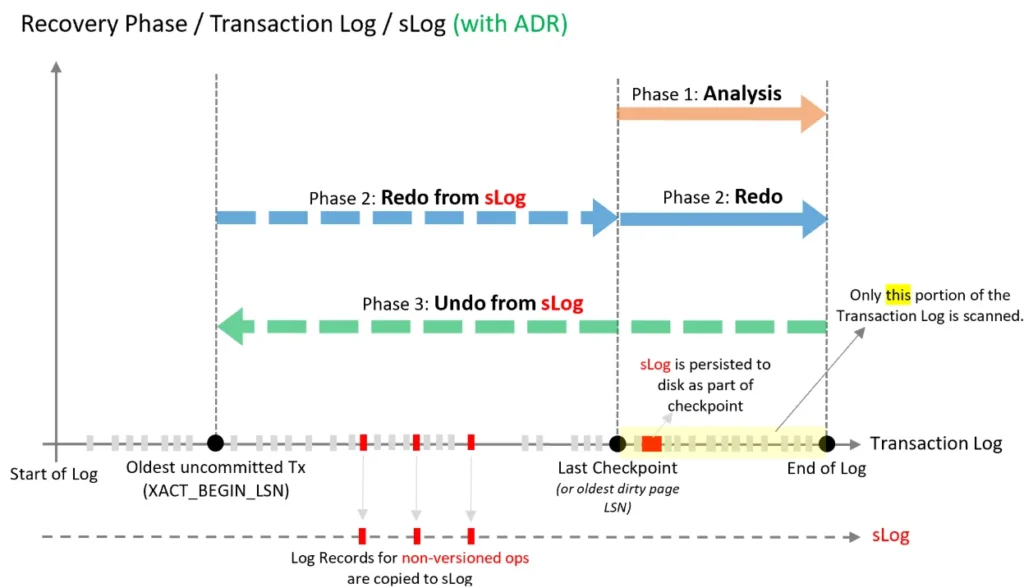
Image Source: Microsoft Learn
ARIES vs. ADR: Why SQL Server 2025 Recovery is Faster
The breakthrough in Accelerated Database Recovery SQL 2025 is the introduction of the Persistent Version Store (PVS). Unlike ARIES, which must scan the entire transaction log to “undo” uncommitted changes, ADR utilizes the PVS to maintain row versions directly within the database. This allows for near-instantaneous rollback and recovery, regardless of transaction size. For architects evaluating Accelerated database recovery vs ARIES recovery model, the decision rests on predictability. ADR ensures that Reduce SQL Server recovery time with ADR 2025 is a reality, providing a deterministic recovery path that is a cornerstone of AWS EC2 SQL Server 2025 High Availability Migration, the strategic roadmap to migrate on-premises to Microsoft Azure, and the critical foundation to migrate SQL Server to Google Cloud for high-concurrency workloads.
[adinserter block=”7″]| Recovery Architecture | Traditional ARIES Model | SQL Server 2025 ADR Optimization |
|---|---|---|
| Recovery Time (RTO) | Proportional to Transaction Length | Near-Instantaneous (Regardless of Size) |
| TempDB Resilience | Prone to “TempDB Full” Hangs | ADR for TempDB Enabled |
| Log Truncation | Blocked by Active Transactions | Aggressive Truncation (Active T-Log) |
| Rollback Speed | Sequential Log Scan (Slow) | PVS-Based Rollback (Instant) |
| Version Governance | System-wide Contention | Resource Governor Governance |
| TCO & Cloud ROI | High Storage Over-provisioning | Maximum Cost Reduction (AWS/Azure) |
Reducing Database TCO with Accelerated Database Recovery: The Decision Maker’s Strategy
Implementing SQL Server 2025 Accelerated Database Recovery Best Practices requires a shift toward proactive resource management. Database Architects and Application Architects who are the Decision-makers must prioritize Reducing Database TCO with Accelerated Database Recovery by mitigating the risk of “log bloat” and “recovery hangs.” When we reduce SQL Server TCO with ADR, we are essentially buying back uptime and reducing the operational overhead of manual DBA intervention. This technical authority ensures that your Mission Critical SQL Server 2025 Internal Optimization translates directly into seamless Business Continuity and superior Customer Experience, maintaining 99.99% availability even during heavy batch processing or unexpected outages.
How to Enable ADR for TempDB in SQL Server 2025 to Prevent Outages
The most significant architectural evolution in the latest engine is the ability to enable ADR for tempdb SQL Server 2025. Traditionally, tempdb was a frequent source of contention, often suffering from “tempdb full” scenarios caused by long-running transactions or massive internal spills. By applying TempDB ADR Configuration, architects can finally leverage the Persistent Version Store (PVS) to ensure that versioning and rollbacks within the temporary workspace occur instantaneously, preventing instance-wide slowdowns.
How to Enable ADR for TempDB in SQL Server 2025: A Step-by-Step Configuration Guide
Implementing this feature is a core component of SQL Server 2025 instance configuration new features. To activate this, one must utilize the ALTER SERVER CONFIGURATION syntax, followed by a mandatory service restart. This deterministic approach allows for SQL Server 2025 resource governor tempdb governance, giving administrators tighter control over how temporary resources are consumed. For those managing an AWS EC2 SQL Server 2025 High Availability Migration, developing the roadmap to migrate on-premises to Microsoft Azure, or executing a plan to migrate SQL Server to Google Cloud SQL, this setting is a “Day 1” priority for DBAs to ensure that secondary replicas and temp-heavy workloads do not bottleneck the primary engine.
How to Enable ADR for TempDB SQL Server 2025 via T-SQL
Knowing how to enable ADR for tempdb SQL Server 2025 requires more than a simple toggle; it demands strategic planning for Persistent Version Store (PVS) Optimization and overhead management. Use the T-SQL below to initiate the configuration. Crucial: A restart of the SQL Server Database Engine service is mandatory for these changes to take effect.
/* Enable ADR for TempDB - Requires SQL Server Service Restart */
ALTER SERVER CONFIGURATION SET ADR_FOR_TEMPDB = ON;
GO
Managing SQL Server 2025 ADR PVS Growth on VLDB: Persistent Version Store (PVS) Optimization
When Managing SQL Server 2025 ADR PVS growth on VLDB, isolation is key. You must follow persistent version store filegroup placement best practices to avoid I/O contention.
Best Practices for PVS Filegroup Placement on High-IOPS Storage
Move PVS to dedicated NVMe storage to troubleshoot PVS size growth SQL Server. This deterministic move ensures that SQL Server 2025 ADR performance impact on high-concurrency OLTP remains minimal.
By adopting these SQL Server 2025 ADR Best Practices, organizations can significantly reduce SQL Server TCO with ADR by minimizing administrative firefighting. This shift toward a more resilient tempdb infrastructure is essential for Mission Critical SQL Server 2025 Internal Optimization, ensuring that transient data spikes no longer threaten global system availability.
Troubleshooting SQL Server 2025 ADR: Managing PVS Growth on VLDBs
Efficiently managing SQL Server 2025 ADR PVS growth on VLDB (Very Large Databases) is critical to maintaining a lean storage footprint. The Persistent Version Store (PVS) can expand rapidly during heavy DML operations, making troubleshoot PVS size growth SQL Server a top priority for architects. To maintain high technical authority, the primary strategy is persistent version store filegroup placement best practices. By moving the PVS to a dedicated, high-speed filegroup on NVMe storage, you isolate versioning I/O from data file contention.
For an Enterprise SQL Server 2025 Disaster Recovery Strategy, ensuring the PVS does not exhaust disk space is vital. Use the following T-SQL to change ADR PVS filegroup and optimize storage:
/* Move PVS to a dedicated filegroup for Optimization */
ALTER DATABASE [YourDB] SET ACCELERATED_DATABASE_RECOVERY = ON
(PERSISTENT_VERSION_STORE_FILEGROUP = [ADR_PVS_FG]);
This proactive Persistent Version Store (PVS) Optimization directly supports Reducing Database TCO with Accelerated Database Recovery by preventing unplanned storage expansion and ensuring consistent performance across AWS EC2 SQL Server 2025 High Availability Migration environments.
Troubleshooting PVS Cleaner Thread Performance and Tuning Cleaner Threads in SQL Server 2025
Achieving a high-performance Enterprise SQL Server 2025 Disaster Recovery Strategy requires moving beyond default configurations to fine-tune the background processes that manage the version store. The “Cleaner Thread” is the engine’s janitor, responsible for purging old row versions from the PVS. For architects managing VLDBs, Troubleshooting PVS cleaner thread performance is a critical skill to prevent version bloat and potential transaction log growth issues.
Implementing ADR Preallocation Factor Best Practices for High-Concurrency OLTP
In high-velocity DML environments, the rate of version generation often outpaces the cleaner’s ability to reclaim space. By applying ADR Preallocation Factor best practices, you can instruct the engine to pre-allocate PVS space, significantly reducing allocation contention during heavy write bursts. This proactive approach is a cornerstone of Mission Critical SQL Server 2025 Internal Optimization, ensuring that the version store remains a performance booster rather than a bottleneck.
Advanced Tuning: Resolving ADR Cleaner Lock Timeout (s) and Latency in SQL 2025
One common “gotcha” when we troubleshoot PVS cleaner latency SQL 2025 is the cleaner thread getting blocked by long-running user transactions. To mitigate this, SQL Server 2025 allows granular control over the ADR cleaner lock timeout (s) SQL 2025 and the ADR cleaner retry timeout (min) configuration.
Note: Unlike the TempDB ADR toggle, there is no need to restart the SQL Server Services for these changes to take effect; they are applied dynamically. Adjusting these parameters ensures the cleaner is more aggressive or patient based on your specific workload profile. Use the following T-SQL to verify and tune these instance-level configurations:
[adinserter block=”8″]/* SQL Server 2025 ADR Master Tuning Script
Description: Consolidating Discovery, Preallocation, and Cleaner Tuning.
Note: All 'sp_configure' changes below are DYNAMIC and do NOT require a service restart.
*/
-- 1. Discovery: Audit current ADR instance-level configurations
SELECT name, value, value_in_use, minimum, maximum, description
FROM sys.configurations
WHERE name LIKE '%ADR%'
ORDER BY name;
-- 2. Performance Tuning: Enable Advanced Configuration
EXEC sp_configure 'show advanced options', 1;
RECONFIGURE;
-- 3. Optimization: Scale Preallocation and Cleaner Behavior
-- Scale Preallocation Factor (Default is 2; increase for high-concurrency VLDB)
EXEC sp_configure 'ADR Preallocation Factor', 4;
-- Optimize Cleaner Lock Timeout (Default is 10s; adjust based on blocking profile)
EXEC sp_configure 'ADR cleaner lock timeout (s)', 15;
-- Optimize Cleaner Retry Interval (Defines frequency of cleanup for skipped pages)
EXEC sp_configure 'ADR cleaner retry timeout (min)', 5;
-- 4. Finalize changes
RECONFIGURE;
GO
-- 5. Verify the 'value_in_use' reflects your changes
SELECT name, value_in_use, description
FROM sys.configurations
WHERE name LIKE '%ADR%';Mastering these settings is vital for SQL Server 2025 on AWS EC2 best practices, where storage throughput and I/O costs are directly tied to your Reducing Database TCO with Accelerated Database Recovery goals. By ensuring efficient version cleanup, you maintain the ‘lean’ state necessary for AWS EC2 SQL Server 2025 High Availability Migration success, the complex roadmap to migrate on-premises to Microsoft Azure, or the strategic foundation required to migrate SQL Server to Google Cloud for high-concurrency enterprise workloads.
SQL Server 2025 Performance Monitoring: New DMVs in SQL Server 2025 for PVS and TempDB Observability
To maintain a Mission Critical SQL Server 2025 Internal Optimization standard, visibility into engine internals is non-negotiable. SQL Server 2025 introduces significant enhancements to telemetry, specifically targeting the deep-tier observability of the Persistent Version Store (PVS) and TempDB behavior. For Senior Architects and for Senior DBAs, sys.dm_tran_persistent_version_store_stats usage is now the primary method for diagnosing version store pressure and peak tempdb data space KB calculation before it impacts enterprise throughput or Business Continuity.
Mastering the New SQL Server 2025 Metrics: Peak TempDB Data Space KB Calculation
The introduction of ADR for TempDB necessitates advanced tracking to ensure Business Continuity. One of the most critical metrics for SQL Server 2025 Performance Monitoring is the peak tempdb data space KB calculation. This metric allows you to understand the high-water mark of TempDB consumption under ADR, enabling deterministic capacity planning for an AWS EC2 SQL Server 2025 High Availability Migration, the roadmap to migrate on-premises to Microsoft Azure, or when you migrate SQL Server to Google Cloud. Additionally, the new tempdb data limit violation count monitoring identifies exactly when your workload exceeds defined resource boundaries, protecting overall system uptime.
Using sys.dm_tran_persistent_version_store_stats DMV for Real-Time Monitoring in SQL Server 2019+
Use the following T-SQL script to monitor PVS health and analyze the SQL Server 2025 tempdb space limit violation count:
/* Monitoring the ADR PVS Health and TempDB SQL Server 2025 Metrics */
SELECT
    pvs_filegroup_id,
    pvs_allocation_unit_id,
    persistent_version_store_size_kb,
    online_index_version_store_size_kb,
    /* New 2025 specific TempDB observability */
    peak_tempdb_data_space_kb,
    total_tempdb_data_limit_violation_count
FROM sys.dm_tran_persistent_version_store_stats;
Integrating these queries into your standard SQL Server 2025 on AWS EC2 best practices toolkit ensures you can troubleshoot PVS size growth SQL Server in real-time. By leveraging these insights, you move from reactive firefighting to a proactive Enterprise SQL Server 2025 Disaster Recovery Strategy, ultimately Reducing Database TCO with Accelerated Database Recovery by optimizing resource allocation and avoiding costly storage over-provisioning.
Reducing SQL Server TCO on AWS EC2 with Accelerated Database Recovery
From an architectural standpoint, Reducing Database TCO with Accelerated Database Recovery is a primary driver for cloud modernization. When executing an AWS EC2 SQL Server 2025 High Availability Migration, the ability to reduce SQL Server TCO with ADR manifests through significantly lower compute and storage overhead. By enabling aggressive log truncation with active transactions, ADR prevents the common “log bloat” that forces over-provisioning of expensive EBS volumes. Successfully navigating the balance of aggressive log truncation vs long running transactions ADR 2025 ensures that even the most demanding batch processes do not impede the immediate reclamation of transaction log space.
Furthermore, integrating ZSTD backup compression SQL 2025 performance with ADR allows for streamlined data protection strategies. Architects can now focus on offloading SQL backups to secondary replica 2025 without fearing the redo-queue latency that traditionally hindered high-availability environments. This synergy is a cornerstone of a modern Enterprise SQL Server 2025 Disaster Recovery Strategy, ensuring that mission-critical SQL Server 2025 internal optimization translates directly into bottom-line savings. By resolving the conflict of aggressive log truncation vs long-running transactions ADR 2025, organizations maximize uptime while minimizing the manual intervention costs associated with legacy recovery models.
[adinserter block=”9″]Strategic Summary: Enterprise SQL Server 2025 Disaster Recovery Strategy Implementation
Finalizing a robust Enterprise SQL Server 2025 Disaster Recovery Strategy requires a holistic view of the database engine’s SQL Server 2025 instance configuration new features. By adopting SQL Server 2025 ADR Best Practices, you move beyond the limitations of the traditional ARIES model to a state of deterministic performance. From managing SQL Server 2025 resource governor tempdb governance to monitoring the SQL Server 2025 tempdb space limit violation count, every technical lever you pull contributes to Reducing Database TCO with Accelerated Database Recovery. Adhering to these standards ensures your infrastructure maintains a competitive, high-availability environment that is Mission Critical SQL Server 2025 Internal Optimization at its core.
Frequently Asked Questions: SQL Server 2025 ADR & TempDB Optimization
1. How to enable ADR for tempdb SQL Server 2025 and why is it a game-changer?
To enable ADR for tempdb SQL Server 2025, you must execute the ALTER SERVER CONFIGURATION command and perform a service restart. This is a “Day 0” requirement for Mission Critical SQL Server 2025 Internal Optimization. Unlike the traditional accelerated database recovery vs ARIES recovery model debate, enabling this feature for tempdb ensures that long-running transactions no longer cause instance-wide “tempdb full” hangs. It provides a deterministic TempDB ADR Configuration that allows for instantaneous rollback of temporary objects, which is essential for SQL Server 2025 on AWS EC2 best practices, the high-availability standards for SQL Server on Microsoft Azure, and ensuring performance stability when you migrate SQL Server to Google Cloud.
2. What are the persistent version store filegroup placement best practices for VLDBs?
When Managing SQL Server 2025 ADR PVS growth on VLDB, the golden rule is isolation. Persistent version store filegroup placement best practices dictate that the PVS should be moved to a dedicated, high-IOPS filegroup—ideally on NVMe storage. This prevents I/O contention with your primary data files. If you need to how to change ADR PVS filegroup, you can do so via an ALTER DATABASE statement. This level of Persistent Version Store (PVS) Optimization is a core component of a modern Enterprise SQL Server 2025 Disaster Recovery Strategy, significantly helping to reduce SQL Server TCO with ADR.
3. How do I troubleshoot PVS size growth and cleaner thread latency in SQL Server 2025?
To troubleshoot PVS size growth SQL Server, you should prioritize sys.dm_tran_persistent_version_store_stats usage to identify if the cleaner is falling behind. If you encounter troubleshoot PVS cleaner latency SQL 2025, consider adjusting the ADR cleaner lock timeout (s) SQL 2025 and the ADR cleaner retry timeout (min) configuration. For high-concurrency environments, applying ADR Preallocation Factor best practices ensures the engine doesn’t struggle with allocation overhead during heavy write bursts. These steps are vital for Troubleshooting PVS cleaner thread performance and maintaining system stability.
4. Can ADR help in reducing SQL Server TCO during an AWS migration?
Absolutely. Reducing Database TCO with Accelerated Database Recovery is one of the strongest ROI arguments for an AWS EC2 SQL Server 2025 High Availability Migration. By enabling aggressive log truncation with active transactions, ADR prevents the massive “log bloat” that typically requires over-provisioning expensive EBS volumes. Successfully managing aggressive log truncation vs long running transactions ADR 2025 means you pay only for the storage you actually need. When combined with ZSTD backup compression SQL 2025 performance, you achieve a leaner, faster, and more cost-effective cloud infrastructure.
5. What are the best practices for ADR on AWS EC2 SQL Server 2025 to ensure High Availability?
Best practices for ADR on AWS EC2 SQL Server 2025 focus on minimizing redo-queue latency. By offloading SQL backups to a secondary replica 2025 and utilizing ADR, you ensure that secondary replicas remain synchronized without the performance drag of the traditional undo phase. This architectural shift is key to Mission-Critical Observability, as it guarantees near-zero RTO and protects overall Business Continuity. Leveraging SQL Server 2025 instance configuration new features like these ensures your AWS EC2 SQL Server 2025 High Availability Migration is resilient, performant, and ready for enterprise-scale workloads
6. How the new SQL Server 2025 DMVs help with TempDB data limit violation monitoring?
The SQL Server 2025 engine provides a specific SQL Server 2025 tempdb data space limit violation count fix through enhanced visibility. By monitoring the peak tempdb data space KB calculation and the total_tempdb_data_limit_violation_count, DBAs can proactively manage SQL Server 2025 resource governor tempdb governance. This granular tempdb data limit violation count monitoring allows you to catch runaway queries before they impact the instance, ensuring that SQL Server 2025 ADR performance impact on high-concurrency OLTP remains positive and predictable.
 Chetna Bhalla
Add comment