
 Ashish Kumar Mehta
How do you move data from SQL Server to BigQuery in real-time?
To move data from SQL Server to BigQuery in real-time, the most efficient method is using Log-Based Change Data Capture (CDC). By capturing row-level changes from the transaction log, you can stream events via Google Cloud Datastream or Dataflow into the BigQuery Storage Write API, achieving sub-second latency for AI and live dashboards.
The Problem: The “Batch Latency” Gap in Modern Infrastructure
For decades, the standard for data warehousing was the nightly batch load. At 12:00 AM, an ETL job would “wake up,” query the production database for everything changed in the last 24 hours, and push it to a warehouse. In 2026, this approach is no longer a viable strategy—it is technical debt.
Whether you are running an on-premises environment or leveraging a Cloud SQL for SQL Server Managed Database, your analytics layer in BigQuery must be a mirror image of reality. When your business relies on SQL Server 2025 to power transactional systems, waiting for a batch job means your executive dashboards are 12 to 24 hours behind. In the world of high-frequency trading, real-time logistics, and generative AI, stale data is dead data.
Furthermore, batch processes create massive I/O spikes. Migrating production SQL Server workloads to BigQuery requires more than a simple pipeline; it requires a zero-data-loss architecture that respects CDC log limits and BigQuery’s Storage Write API quotas. Without this expert-level precision, querying millions of rows at once often leads to “Micro-Throttling” on cloud disks, impacting the end-user experience of your primary application.
The Solution: Streaming Architecture (CDC + Write API)
The solution lies in shifting from a Pull mechanism (Batch) to a Push mechanism (Streaming). Instead of asking the database “What changed?”, the database proactively emits events the moment a COMMIT happens.
By leveraging SQL Server Change Data Capture (CDC), we tap directly into the transaction log. This is non-obstructive; it doesn’t lock tables or slow down INSERT operations. These events are then picked up by an ingestion layer—ideally Google Cloud Datastream or a Debezium-on-GKE setup—and pushed into BigQuery using the Storage Write API.
The Critical Prerequisite: Snapshot Isolation
A major challenge in real-time migration is the “Initial Backfill.” To ensure 100% data consistency between your legacy SQL Server data and the new BigQuery stream, you must enable Snapshot Isolation.
Without this, if a row is updated while your ingestion tool is performing its initial scan, you may end up with a “Partial State” or missed records. Snapshot isolation allows the ingestor to read a consistent version of the data as it existed at the start of the migration without blocking writers or being blocked by active transactions.
This architecture provides the “Mantra” of modern data: Consistency, Scalability, and Speed.
What is Cloud SQL for SQL Server? It is a managed SQL Server instance (supporting 2017, 2019, 2022, and 2025) that provides enterprise-grade compatibility with native GCP integrations. While Cloud SQL is our top recommendation for GCP users, choosing between cloud providers is a critical decision. You can see how it stacks up against the competition in our deep-dive on Cloud SQL vs. Azure SQL: Performance Benchmarking.
T-SQL Code to Enable Snapshot Isolation for Data Consistency
-- Step 1: Enable Snapshot Isolation for Data Consistency
-- This allows the streaming agent to take a consistent 'snapshot' of the
-- existing data without locking production tables.
ALTER DATABASE [MantraSalesDB]
SET ALLOW_SNAPSHOT_ISOLATION ON;
GO

-- Step 2: Enable Read Committed Snapshot (Optional but Recommended)
-- This reduces contention between the CDC scan and concurrent DML operations.
ALTER DATABASE [MantraSalesDB]
SET READ_COMMITTED_SNAPSHOT ON
WITH ROLLBACK IMMEDIATE;
GO
Architecture Overview: The Modern SQL Server to BigQuery Pipeline
To implement a robust, enterprise-grade data strategy, you must move away from point-to-point migrations. The diagram below illustrates the high-authority architecture for SQL Server to BigQuery real-time streaming, utilizing log-based Change Data Capture (CDC) to minimize source system impact.
Technical Breakdown: How the Real-Time Stream Works
This architecture is engineered for sub-second latency, ensuring that your Google Cloud data modernization efforts deliver immediate business value.
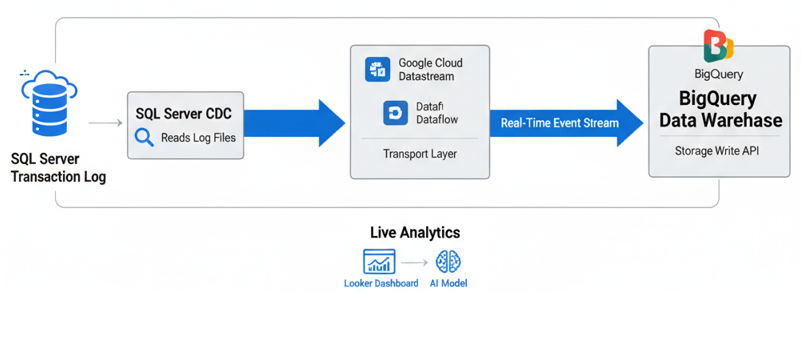
- Log-Based Capture: Unlike traditional ETL which queries tables directly, this pipeline reads the SQL Server Transaction Log. This is the “Gold Standard” for low-latency SQL Server cloud migration because it bypasses the compute overhead of the database engine, allowing your production apps to remain fast.
- Streaming Ingestion: Using Google Cloud Datastream or Dataflow, row-level changes (Inserts, Updates, Deletes) are transformed into an event-driven stream. This handles the heavy lifting of SQL Server CDC to BigQuery latency optimization, ensuring data consistency even during network fluctuations.
- BigQuery Storage Write API: The events are committed to BigQuery via the Storage Write API. This modern endpoint supports exactly-once delivery semantics, which is a critical requirement for financial and transactional real-time analytics on GCP.
- Downstream AI & BI: Once in BigQuery, the data is instantly available for Looker dashboards and Vertex AI models, enabling what we call “Mantra-speed” decision making.
Technical Implementation: Preparing the Source Environment
To reach “Expert” proficiency, a DBA must ensure the source is perfectly tuned. CDC setup requires administrative precision to avoid log-file bloat.
Step 1: Database-Level CDC Configuration
Before any table can be tracked, the database must be prepared. This creates the necessary metadata schemas (cdc.) and system tables.
USE [MantraSalesDB];
GO

-- Check if CDC is already enabled
IF (SELECT is_cdc_enabled FROM sys.databases WHERE name = 'MantraSalesDB') = 0
BEGIN
    EXEC sys.sp_cdc_enable_db;
    PRINT 'CDC Enabled for MantraSalesDB';
END
GO
Step 2: Table-Level Capture with Net Changes
We only want to capture tables that drive business value. Enabling CDC on every table can cause unnecessary I/O.
EXEC sys.sp_cdc_enable_table
    @source_schema = N'Sales',
    @source_name   = N'Orders',
    @role_name     = N'cdc_admin', -- Secure access to change data
    @supports_net_changes = 1; -- Required for syncing the 'final state' of a row
GO
Step 3: Fetching the Net Changes (Custom Ingestor Logic)
This script is what an actual ETL tool uses to pull the data.
DECLARE @from_lsn binary(10), @to_lsn binary(10);
-- Map a point in time to an LSN (Log Sequence Number)
SET @from_lsn = sys.fn_cdc_get_min_lsn('dbo_Orders');
SET @to_lsn   = sys.fn_cdc_get_max_lsn();

-- Query all net changes for the specified range
SELECT * FROM cdc.fn_cdc_get_net_changes_dbo_Orders(@from_lsn, @to_lsn, 'all');
GO
Step 4: Proactive Pipeline Health Check
A real-time pipeline is only as good as its monitoring. Use the following T-SQL script to ensure your CDC capture job isn’t falling behind the transaction log’s growth.
-- Professional Health Check for CDC Performance
-- High latency here indicates the log is growing faster than it can be streamed.
SELECT
    latency AS [LatencyInSeconds],
    last_commit_time AS [LastCommitedToCDC],
    (SELECT count(*) FROM sys.dm_cdc_errors) AS [ErrorCount],
    [scan_phase] AS [CurrentPhase]
FROM sys.dm_cdc_log_scan_sessions
ORDER BY last_commit_time DESC;
GO
Deep Dive: The BigQuery Storage Write API Advantage
In 2026, we no longer use the old tabledata.insertAll method. It is too slow and costly for high-velocity streams. The BigQuery Storage Write API is the enterprise standard. It combines streaming ingestion and batch processing into a single, high-performance pipe.
It supports exactly-once semantics and stream-level offsets, ensuring that even if your network blips between your SQL Server and GCP, you won’t have duplicate records or missing data in your analytics.
Data Type Mapping: The Silent Pipeline Killer
One of the most frequent reasons for pipeline failure is a mismatch between T-SQL types and BigQuery types. As part of your SQL Server Modernization strategy, refer to this mapping:
| SQL Server Type | BigQuery Type | Technical Context & Recommendation |
|---|---|---|
DATETIMEOFFSET |
TIMESTAMP |
Essential for 2026 global apps. Ensures all time-series data is normalized to UTC during ingestion. |
UNIQUEIDENTIFIER |
STRING |
Standard practice. BigQuery filters high-cardinality strings with extreme efficiency. |
DECIMAL / NUMERIC |
NUMERIC |
Use BIGNUMERIC for scientific or ultra-high precision financial data. |
VARBINARY(MAX) |
BYTES |
Ideal for storing encoded signatures or small compressed payloads. |
BIT |
BOOL |
Ensure your ingestion tool (like Datastream) doesn’t cast this as an Integer. |
Best Practices for Enterprise SQL Server to BigQuery Real-Time Pipelines
Implementing the technical connection is only the beginning. To ensure your 2026 analytics environment is sustainable, secure, and cost-effective, follow these best practices for enterprise scalability.
1. Source Optimization: Managing SQL Server CDC Overhead
Change Data Capture is powerful but requires proactive database administration to prevent production bottlenecks.
- Dedicated Log Storage: Since CDC prevents transaction log truncation until changes are captured, your
.ldffiles will grow. Ensure your SQL Server uses dedicated high-speed storage, such as Google Hyperdisk Balanced, to handle the increased I/O. - Retention & Cleanup Policies: Don’t allow CDC data to bloat your source database. Configure your cleanup jobs to retain change data for only 24–48 hours. This provides a sufficient buffer for ingestion delays without exhausting disk space.
- Log Usage Monitoring: Set automated alerts for Transaction Log Usage %. A stalled ingestion agent can lead to a full disk, causing a production outage. For a deep dive into log growth management during this step, see FAQ #1 below.
- Setting up real-time streams can occasionally lead to resource contention. If you encounter unexpected latency or handshake errors, refer to our guide on SQL Server GCP Troubleshooting for Connectivity and CPU Fixes to keep your pipeline running smoothly.
2. Sink Optimization: BigQuery Cost & Performance Tuning
Streaming millions of rows into BigQuery can lead to a massive cloud bill if your storage strategy is poorly defined.
- Partitioning for Query Pruning: Always use Time-Unit Partitioning. Partitioning your destination tables by ingestion time (
_PARTITIONTIME) or a source timestamp ensures that queries only scan relevant data slices, drastically reducing processing costs. - Clustering for High-Cardinality Columns: Cluster your tables by frequently filtered columns like
CustomerID,StoreID, orRegionCode. Clustering reorganizes data blocks, allowing BigQuery to “skip” irrelevant data, which can improve query performance by up to 90%. - Leveraging BigQuery “Max Staleness”: In 2026, use the
max_stalenesstable option (e.g.,SET OPTIONS(max_staleness = INTERVAL '5' MINUTE)). This allows BigQuery to cache metadata, significantly lowering the cost of frequent streaming merges while maintaining a near real-time experience.
3. Operational Resilience: Handling Schema Evolution & Errors
A real-time stream must be resilient to changes in the source schema.
- Dynamic Schema Evolution: Ensure your transport layer (like Google Cloud Dataflow) is set to “Update Schema” mode. This allows the pipeline to adapt when new columns are added to SQL Server without manual intervention or pipeline crashes.
- Dead Letter Queues (DLQ): Implement a DLQ to capture malformed records or data type mismatches. This ensures the entire pipeline doesn’t stop due to a single “bad” row, allowing you to fix and re-ingest data later.
- Versioned Staging: Consider using a “Staging” table in BigQuery for raw CDC data before merging it into your “Golden” production tables. This provides a layer of data validation and historization.
4. Security: Zero-Trust & Zero-Leakage Architecture
Modern cloud security for SQL Server to BigQuery real-time analytics requires moving away from legacy credential management.
- Workload Identity Federation: Stop using static Service Account JSON keys. In 2026, the gold standard is Workload Identity Federation, which allows your SQL Server environment to authenticate to Google Cloud using short-lived, auto-rotating tokens.
- Encryption at Rest & In-Transit: Ensure all data is encrypted in transit using TLS 1.3. For highly regulated industries, use Customer-Managed Encryption Keys (CMEK) in BigQuery to maintain full control over your data encryption lifecycle.
- Principle of Least Privilege: Grant the CDC capture agent only the
db_datareaderanddb_owner(temporary for setup) roles, and limit the GCP Service Account to specific BigQuery DatasetDataEditorroles.
SQL Server to BigQuery Data Type Mapping Reference (2026 Edition)
| Category | Best Practice | Primary Goal |
|---|---|---|
| Source | 24-48 Hour CDC Retention | Prevent .ldf Log Bloat |
| Transport | Dead Letter Queues (DLQ) | Pipeline Resilience |
| Sink | max_staleness = 5-10m |
Drastic Cost Reduction |
| Security | Workload Identity Federation | Eliminate Static JSON Keys |
Scale Your Data Modernization with the 2026 Enterprise Migration ToolkitEliminate manual schema mapping and prevent production pipeline crashes with our field-tested scripts and architecture safeguards. 🛠️ Download: The SQL Server to BigQuery “Mantra” Production ToolkitStop worrying about data drift and log bloat. Our 2026 edition provides the exact automation scripts and audit checklists required to maintain 99.9% pipeline uptime and guaranteed data consistency.
|
*Swipe left to view full toolkit details. ←
SQL Server to BigQuery Data Type Mapping Cheat Sheet
To prevent “Type-Mismatch” errors in your real-time stream, use this definitive mapping guide for SQL Server 2025 to BigQuery.
| SQL Server Source Type | BigQuery Target Type | Implementation Rule |
|---|---|---|
| BIGINT | INT64 | Native mapping for 8-byte integers. |
| DECIMAL | NUMERIC | Use BIGNUMERIC if precision > 38 digits. |
| BIT | BOOL | Prevents logic errors in analytical dashboards. |
| DATETIME2 | DATETIME | Supports microsecond precision for audit trails. |
| DATETIMEOFFSET | TIMESTAMP | Auto-normalizes to UTC for global reporting. |
| UNIQUEIDENTIFIER | STRING | Standard practice for storing UUIDs/GUIDs. |
| VARBINARY | BYTES | Ideal for binary objects or encrypted strings. |
| GEOGRAPHY | GEOGRAPHY | Enables GIS analytics and spatial joins. |
Conclusion: The “Mantra” for Real-Time Data Modernization
The transition from SQL Server to BigQuery is no longer a simple lift-and-shift migration; it is a fundamental shift in enterprise data capability. By moving away from legacy batch processing and implementing log-based Change Data Capture (CDC) with streaming architectures, you transform your source database from a passive storage silo into a high-velocity engine for real-time business intelligence.
Whether you are leveraging SQL Server 2025 New Features or optimizing high-traffic SQL Server 2019 instances, the objective is clear: deliver actionable data to your AI models and Looker dashboards the millisecond a transaction is committed. By following the MyTechMantra blueprint—prioritizing BigQuery Storage Write API efficiency, Workload Identity security, and Max Staleness cost optimization—you ensure your data pipeline is not only fast but sustainable and secure for the future of the intelligent cloud.
Next Steps
Now that you have the architectural blueprint for a real-time SQL Server to BigQuery pipeline, here is how you can move from theory to production:
- Audit Your Current Latency: Use our custom health-check script with
sys.dm_cdc_log_scan_sessionsto identify if your current ETL process is creating a data-freshness gap. - Compare Cloud Performance: If you haven’t finalized your cloud destination, read our deep-dive on Cloud SQL vs. Azure SQL Performance to determine which managed service offers the best throughput for your specific workload.
- Stay Ahead with SQL Server 2025: Explore how the latest engine enhancements impact your cloud migration strategy in our SQL Server 2025 New Features Guide.
- Download the Mapping Cheat Sheet: Access our proprietary SQL Server-to-BigQuery Data Type Mapping guide to ensure your schema evolution never breaks a production stream.
Frequently Asked Questions (FAQs) on SQL Server to BigQuery Real-Time Integration
1. What is the most efficient way to handle SQL Server CDC log growth during BigQuery ingestion?
The most efficient way to manage log growth is to ensure your ingestion agent (like Google Cloud Datastream) is optimized for high-throughput and that you have a proactive log truncation safeguard. In SQL Server, the transaction log cannot be truncated until the CDC capture job has processed the changes. To prevent disk pressure, we recommend using high-performance storage like Google Hyperdisk Balanced and setting a CDC retention period of 24–48 hours, which balances recovery needs with storage costs.
2. Can I stream SQL Server DATETIMEOFFSET and UNIQUEIDENTIFIER types to BigQuery directly?
Yes, but you must map them correctly to maintain data integrity. In a real-time SQL Server to BigQuery pipeline, DATETIMEOFFSET should be mapped to the TIMESTAMP type in BigQuery to ensure all data is normalized to UTC. For UNIQUEIDENTIFIER (GUIDs), the best practice is to map them to STRING. While BigQuery doesn’t have a native UUID type, its indexing engine handles string-based GUIDs with sub-second latency, making it ideal for joining large datasets.
3. How does the BigQuery Storage Write API improve real-time streaming performance?
The BigQuery Storage Write API is a significant upgrade over legacy streaming inserts, offering exactly-once delivery semantics and reduced ingestion costs. It allows for stream-level offsets, meaning if your pipeline from SQL Server 2025 fails, it can resume exactly where it left off without duplicating rows. For architects, this ensures data consistency in financial dashboards and real-time AI models where accuracy is non-negotiable.
4. Is log-based CDC better than query-based ETL for Google Cloud data modernization?
Log-based Change Data Capture (CDC) is vastly superior to query-based ETL because it reads the transaction log directly, bypassing the compute-heavy SQL engine. This means your production database remains fast while BigQuery receives updates in near real-time. Query-based methods require frequent SELECT statements which increase lock contention and latency, making them unsuitable for enterprise-grade data modernization projects.
5. How do I handle SQL Server schema changes without breaking my BigQuery pipeline?
To handle schema evolution in 2026, you should utilize a Schema Registry or configure your Dataflow templates to “Update Schema” mode. When a NULLABLE column is added to your source SQL Server table, the pipeline should automatically propagate that column to BigQuery. For breaking changes, implementing a Dead Letter Queue (DLQ) is the “Mantra” for resilience, as it captures failed records without stopping the entire data stream.
6. What is “Max Staleness” in BigQuery and how does it reduce streaming costs?
Max Staleness is a BigQuery table setting that allows you to trade a few minutes of data “freshness” for significant cost savings. By setting max_staleness to 5 or 10 minutes, BigQuery can use cached metadata for queries instead of performing a full metadata scan for every streaming commit. This is a critical cost-optimization strategy for companies streaming millions of rows per hour from SQL Server environments.
7. Why should I use Workload Identity Federation instead of Service Account Keys?
In modern Zero-Trust cloud architectures, static Service Account JSON keys are considered a major security vulnerability. Workload Identity Federation allows your on-premises or hybrid SQL Server to authenticate to Google Cloud via short-lived tokens. This eliminates the need for key rotation and ensures that your SQL Server to BigQuery real-time stream complies with the highest 2026 cybersecurity standards for data in transit.
 Chetna Bhalla
Add comment