
 Ashish Kumar Mehta
Troubleshooting SQL Server on Google Cloud Platform (GCP)
To resolve SQL Server connectivity on GCP, first verify your Private Service Connect (PSC) endpoint status or VPC Peering transitive routing. For high CPU issues, query sys.dm_os_waiting_tasks to identify IOPS throttling or signal waits. The expert “Mantra” for 2026 is migrating to Hyperdisk Balanced or Cloud SQL Enterprise Plus to eliminate cloud-native storage bottlenecks and ensure 99.99% availability.
Introduction: The Shift from On-Premises to Cloud-Native DB Management
Transitioning SQL Server workloads to Google Cloud Platform (GCP) introduces a paradigm shift in how we approach troubleshooting. On-premises, you control the hardware, the VLAN, and the storage fabric. In GCP, whether you are using Cloud SQL for SQL Server (Managed) or SQL Server on Compute Engine (IaaS), you are operating within a software-defined infrastructure.
This guide serves as your master blueprint for identifying, diagnosing, and resolving the two most common “showstoppers” in cloud environments: Connectivity Disruptions and CPU/Performance Bottlenecks. As we move into the era of SQL Server 2025, understanding the underlying Google Cloud networking stack is no longer optional for the modern DBA.
The Connectivity Crisis: Why Your SQL Server is Unreachable
Connectivity is the most frequent ticket item. In GCP, networking is restricted by default.
Problem: The “Error 26 – Error Locating Server/Instance Specified”
When an application tries to connect, it often fails with a timeout. This is rarely a SQL Server service failure; it is almost always a “Security Policy” or “Routing” failure.
Root Causes in the Cloud Layer
- Missing Firewall Rules: Unlike on-prem, GCP denies all ingress traffic. Port 1433 must be explicitly opened.
- Private vs. Public IP Conflict: Enterprises often disable Public IP, yet the application isn’t configured for Private Services Access (PSA).
- Auth Proxy Failures: If using the Cloud SQL Auth Proxy, the service account often lacks the
Cloud SQL ClientIAM role.
The Connectivity Deep-Dive: Auth Proxy vs. VPC Peering vs. Private Service Connect (PSC)
In 2026, the landscape of GCP connectivity has evolved. To troubleshoot effectively, you must understand which “bridge” your data is crossing.
When addressing GCP Troubleshooting for connection issues, the first step is identifying the routing path. If you are using Private Service Connect, ensure your service attachment is correctly published and the endpoint IP is reachable from your local VPC.
For those using VPC Peering (PSA), verify the peering state and ensure no CIDR overlaps exist. Moving to a Private Service Connect architecture is often the recommended “Mantra” for enterprises seeking a more scalable, secure, and transitive networking model.
The Cloud SQL Auth Proxy: The IAM-First Mantra
The Cloud SQL Auth Proxy remains the gold standard for secure, short-lived connections. It doesn’t rely on authorized networks or complex firewall rules; instead, it uses Identity and Access Management (IAM).
- How it Works: The proxy creates a secure tunnel (TLS 1.3) from your local environment or GKE pod to the database instance.
- Troubleshooting Tip: If the proxy fails to start, check the
sqladmin.googleapis.comAPI status and ensure the service account has the Cloud SQL Editor or Client role. In SQL Server 2025 environments, using the proxy is highly recommended for GKE Sidecar patterns to avoid managing static IP addresses.
Private Service Access (PSA) via VPC Peering: The Legacy Standard
PSA has been the traditional way to provide private IP access to Cloud SQL. It creates a VPC Network Peering between your VPC and a Google-managed VPC.
- The Trap: VPC Peering is non-transitive. If your application is in VPC-A, and VPC-A is peered with VPC-B (where SQL resides), a client in VPC-C cannot “jump” through B to reach A.
- Troubleshooting Tip: If you see “Network Unreachable” despite having a private IP, check for IP Address Overlap. If the range you allocated for Google Services (
/24or larger) overlaps with your local subnets, the packets will be dropped.
Private Service Connect (PSC): The 2026 Enterprise Choice
Private Service Connect is the most robust connectivity option for complex enterprise architectures. Unlike Peering, which connects entire networks, PSC connects a specific service endpoint to your VPC.
- Why it Wins: It bypasses the non-transitivity limits of Peering. You can access a SQL instance in Project A from a completely different Organization in Project B without complex VPNs.
- Troubleshooting Tip: Ensure your Service Connection Policy is correctly configured. If you can’t resolve the instance name, verify that the Cloud DNS peering zone was automatically created during the PSC setup. PSC is the “Mantra” for Multi-Cloud or Multi-Region SQL deployments.
Strategic Comparison: Cost, Complexity, and Capability
Choosing the right “Mantra” for connectivity depends on balancing your security requirements against your budget. Below is a breakdown of how these methods impact your GCP bill and operational overhead.
| Feature | Cloud SQL Auth Proxy | VPC Peering (PSA) | Private Service Connect (PSC) |
|---|---|---|---|
| GCP Resource Cost | Free (Software Utility) | Free (No hourly fee) | Paid (~$0.01/hr per endpoint) |
| Data Processing Fee | Standard Egress | $0.01 per GB (Inter-zone) | $0.01 per GB (Processed) |
| Setup Complexity | Medium (Requires Sidecar) | High (VPC/IP Planning) | Low (Endpoint-based) |
| Security Model | IAM-Based (Strongest) | Network-Based | Target-Based (Isolated) |
| Transitive Routing | Yes | No (Non-transitive) | Yes (Flexible) |
| Ideal For | Developers & DBAs | Simple Single-VPC Apps | Enterprise Multi-Project |
*Swipe left to view full table on mobile devices.
The Performance Bottleneck: Solving High CPU and Latency in the Cloud
In an on-premises environment, “High CPU” usually means you need more hardware. In Google Cloud, High CPU is often a symptom of infrastructure configuration mismatches rather than raw computational demand. To troubleshoot this effectively, we must look beyond sys.dm_os_schedulers and examine how SQL Server interacts with GCP’s compute and storage abstraction layers.
Before applying these CPU fixes, ensure your instance is correctly provisioned by reviewing our Cloud SQL vs Azure SQL Performance Benchmarking 2026 report.
Decoding the “CPU Spike” in a Virtualized Ecosystem
When a DBA sees 100% CPU on a Google Compute Engine (GCE) instance or a Cloud SQL instance, the immediate reaction is often to “scale up.” However, in a multi-tenant cloud environment, CPU metrics can be deceptive. Proactive monitoring is key, but the best way to avoid CPU spikes is to implement a modern, efficient data architecture. If your goal is data movement, using log-based CDC is far more efficient than traditional ETL. See our full implementation breakdown here: SQL Server to BigQuery: Real-Time Analytics Implementation.
vCPU Over-subscription and “Steal Time”
Unlike physical cores, vCPUs are threads on a physical host. If you are using shared-core machines (like the E2 series), you may encounter “Steal Time,” where the underlying hypervisor takes cycles away from your VM to serve others.
- The Mantra: For production SQL Server workloads, always use sole-tenant nodes or N2/N2D/C3 machine types with dedicated CPU platforms. This ensures that a “CPU spike” is actually caused by your T-SQL code and not by a “noisy neighbor” on the same physical host.
MAXDOP: The Silent Performance Killer on Google Cloud
One of the most common mistakes in cloud migrations is leaving the Max Degree of Parallelism (MAXDOP) at its default value (0). In GCP, where vCPUs may not align 1:1 with physical NUMA nodes, a single query might try to span across all available vCPUs, leading to massive CXPACKET waits.
📘 Deep Dive: Master the New Era of SQL Troubleshooting is only half the battle. To fully leverage cloud-native capabilities, you need to understand the architectural shifts in the latest release. Explore our Comprehensive Guide to SQL Server 2025 New Features to learn about Bitwise enhancements, OpenTelemetry integration, and AI-driven performance tuning.
- Expert Recommendation: For SQL Server on GCP, set MAXDOP to half the number of vCPUs, with a maximum of 8. For SQL Server 2025, enable DOP Feedback, which allows the engine to learn from previous executions and automatically lower the DOP for specific queries that are causing CPU contention.
Storage Throughput: When Your Disk Latency Masks as CPU Usage
In 2026, the most significant “Cloud Performance Mantra” is understanding the IOPS-to-CPU relationship. In GCP, if your disk cannot serve data fast enough, the CPU enters a “Wait State.” Interestingly, many monitoring tools report this as high CPU utilization because the processor is constantly switching contexts trying to find work it can do.
IOPS Throttling and the Persistent Disk Burst Limit
Google Cloud limits disk performance based on the size of the volume and the machine type. If you have a 200GB pd-balanced disk, you are capped at a specific number of IOPS. When SQL Server hits this cap, you will see high PAGEIOLATCH_SH waits.
- The Trap: Many DBAs assume that because they have 16 vCPUs, they have high performance. But if your disk throughput is capped at 240 MB/s, those 16 vCPUs will spend 80% of their time waiting for the disk.
- The Solution: Use Hyperdisk Balanced. Introduced as the new standard for 2026, Hyperdisk allows you to scale IOPS and Throughput independently of disk size. This is a game-changer for SQL Server modernization because it lets you pay for performance without paying for wasted gigabytes of storage.
Moving to Hyperdisk for 2026 Workloads
If your troubleshooting reveals high disk queue lengths, the “Mantra” for 2026 is migrating to Hyperdisk. It provides lower latency than traditional SSD Persistent Disks and is optimized for the random I/O patterns typical of SQL Server transactional workloads.
Memory and TempDB Optimization: The Local SSD Advantage
Memory pressure in the cloud leads to aggressive paging, which further stresses the storage layer. For SQL Server on Compute Engine, the “Expert” approach involves offloading the most intensive I/O tasks to Local SSDs.
- TempDB Placement: By default, TempDB resides on the boot disk or the data disk. This is a performance bottleneck. By using a GCE instance with Local SSD (physically attached to the host), you can achieve sub-millisecond latency for TempDB.
- Buffer Pool Extension (BPE): If your vRAM is limited due to budget constraints, you can use Local SSD as a Buffer Pool Extension. While not as fast as RAM, it is significantly faster than standard Persistent Disks, providing a “buffer” against sudden spikes in read-heavy workloads.
SQL Server 2025 IQP: Automating the Performance Mantra
With the release of SQL Server 2025, several “Intelligent Query Processing” (IQP) features have been optimized specifically for cloud environments like GCP.
- Memory Grant Feedback: Cloud SQL instances often have strict memory limits. SQL Server 2025 identifies queries that ask for too much memory (wasting resources) or too little (spilling to disk) and adjusts the grant for the next execution.
- Optimized Locking: This feature reduces the lock memory footprint. In cloud environments where memory is a premium cost, optimized locking allows for higher concurrency without the need to scale up to a more expensive instance type.
- Degree of Parallelism (DOP) Feedback: As mentioned earlier, this is critical for GCP. It solves the “Parallelism vs. CPU” conflict by self-tuning the query execution plan based on observed performance.
Expert T-SQL: Deep Performance Auditing for GCP
High CPU “Signal Waits” are frequently a symptom of underlying storage limits. To achieve peak Cloud SQL Performance, you must monitor IOPS consumption.
If you encounter throttling, consider upgrading to the Enterprise Plus Edition. This tier provides the high-performance backbone necessary for demanding workloads. Furthermore, migrating to Hyperdisk Balanced storage allows you to scale IOPS independently of capacity, ensuring your SQL Server 2025 IQP features, like Memory Grant Feedback, have the consistent throughput they need to thrive.
To prove that your performance issue is cloud-specific, you need to run an audit that looks at “Wait Statistics.”
Note: These scripts are essential for your Cloud “Health Check” Mantra.
T-SQL 1: Identifying Top Wait Types Stats
-- Identify the top "Wait Types" causing delays on your GCP instance
SELECT TOP 10
    wait_type,
    wait_time_ms / 1000 AS [Wait Time (Seconds)],
    (wait_time_ms - signal_wait_time_ms) / 1000 AS [Resource Wait (Seconds)],
    signal_wait_time_ms / 1000 AS [Signal Wait (Seconds)], -- High Signal Wait = CPU Pressure
    max_wait_time_ms,
    percentage = CAST(100.0 * wait_time_ms / SUM(wait_time_ms) OVER() AS DECIMAL(5,2))
FROM sys.dm_os_wait_stats
WHERE wait_type NOT IN (
    'CLR_SEMAPHORE','LAZYWRITER_SLEEP','RESOURCE_QUEUE','SLEEP_TASK',
    'SLEEP_SYSTEMTASK','SQLTRACE_BUFFER_FLUSH','WAITFOR', 'LOGMGR_QUEUE',
    'CHECKPOINT_QUEUE','REQUEST_FOR_DEADLOCK_SEARCH','XE_TIMER_EVENT',
    'BROKER_TO_FLUSH','BROKER_TASK_STOP','CLR_MANUAL_EVENT',
    'CLR_AUTO_EVENT','DISPATCHER_QUEUE_SEMAPHORE', 'FT_IFTS_SCHEDULER_IDLE_WAIT',
    'XE_DISPATCHER_WAIT', 'XE_DISPATCHER_JOIN', 'SQLTRACE_INCREMENTAL_FLUSH_SLEEP'
)
ORDER BY wait_time_ms DESC;
Mantra Analysis:
- If Signal Wait is high (>20%): You have a genuine CPU bottleneck. Your CPU is ready to work, but the scheduler is full.
- If Resource Wait is high: Your CPU is waiting on something else (likely
PAGEIOLATCHfor disk orNETWORK_IO). Scaling CPU will not help; you must address the underlying resource.
T-SQL 2: Identifying High CPU & Wait Stats
-- Find queries causing the most CPU pressure in the last hour
SELECT TOP 10
    SUBSTRING(st.text, (qs.statement_start_offset/2) + 1,
    ((CASE statement_end_offset WHEN -1 THEN DATALENGTH(st.text)
    ELSE qs.statement_end_offset END - qs.statement_start_offset)/2) + 1) AS [Query Text],
    qs.total_worker_time / 1000 AS [Total CPU ms],
    qs.execution_count,
    [Avg CPU ms] = (qs.total_worker_time / 1000) / qs.execution_count,
    qp.query_plan
FROM sys.dm_exec_query_stats AS qs
CROSS APPLY sys.dm_exec_sql_text(qs.sql_handle) AS st
CROSS APPLY sys.dm_exec_query_plan(qs.plan_handle) AS qp
ORDER BY [Total CPU ms] DESC;
T-SQL 3: Monitoring Virtual File Stats (Disk Latency)
-- Detect if GCP Disk Throttling is slowing down your SQL Engine
SELECT
    DB_NAME(vfs.database_id) AS [Database],
    mf.name AS [Logical Name],
    [Read Latency ms] = io_stall_read_ms / NULLIF(num_of_reads, 0),
    [Write Latency ms] = io_stall_write_ms / NULLIF(num_of_writes, 0),
    [Total IO ms] = io_stall / NULLIF(num_of_reads + num_of_writes, 0),
    mf.physical_name
FROM sys.dm_io_virtual_file_stats(NULL, NULL) AS vfs
JOIN sys.master_files AS mf ON vfs.database_id = mf.database_id
    AND vfs.file_id = mf.file_id
WHERE io_stall > 0
ORDER BY [Read Latency ms] DESC;
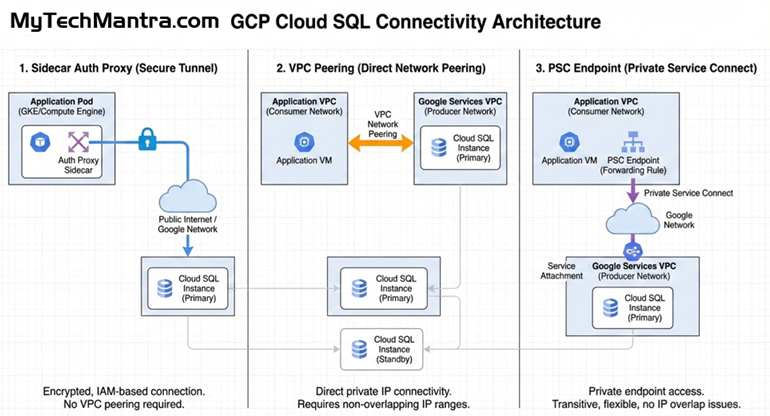
Technical Diagram: The Connectivity Architecture
Explore the essential GCP Cloud SQL architecture patterns for SQL Server on Google Cloud, featuring a side-by-side comparison of Sidecar Auth Proxy, VPC Peering, and Private Service Connect (PSC).
Master the expert “Mantra” for troubleshooting SQL Server connectivity on GCP by implementing transitive, high-security PSC endpoints to eliminate IP conflicts and streamline your enterprise database modernization.
Best Practices for an Evergreen SQL Environment on GCP
- Enable Memory-Optimized Instances: SQL Server thrives on RAM. Use
m3types for high-performance workloads. - Integrated AD: Use GCP Managed Microsoft AD for a seamless Windows Auth experience.
- Automated Storage Scaling: Enable the “Automatic Storage Increase” feature in Cloud SQL to prevent “Disk Full” outages.
- SQL Server 2025 Upgrades: Transition to 2025 to take advantage of Optimized Locking and Vector Data Types for AI-integrated applications.
Leading the SQL Server Modernization Mantra
To stay ahead in 2026, your strategy must evolve beyond simple maintenance. Effective GCP Troubleshooting is no longer just about fixing errors; it’s about architecting for Cloud SQL Performance from day one. By leveraging Private Service Connect for secure networking and upgrading to the Enterprise Plus Edition, you unlock the full power of SQL Server 2025 IQP (Intelligent Query Processing). These pillars form the foundation of a resilient, modern database environment on Google Cloud.
Final Thoughts: Your Expert Mantra for SQL Server on GCP Database Modernization and Connectivity
Successfully troubleshooting SQL Server on Google Cloud Platform (GCP) requires a strategic blend of traditional DBA wisdom and modern cloud networking expertise. As enterprises accelerate their database modernization journeys, the ability to navigate complex SQL Server connectivity patterns becomes a critical competitive advantage.
Whether you are scaling a mission-critical instance on Compute Engine or managing a high-performance fleet with Cloud SQL Enterprise Plus Edition, your success is built on the foundations of IAM-based security, Private Service Connect (PSC) architecture, and proactive IOPS management. By mastering these “Mantras,” you don’t just fix errors—you architect for a 99.99% availability SLA, ensuring your SQL Server on GCP environment is resilient, scalable, and optimized for the future of the cloud.
Next Steps
- Perform a Network Audit: Verify if your production workloads are using legacy PSA or the modern PSC.
- Review Performance: Use the provided T-SQL scripts to check for hidden disk latency.
- Stay Updated: Read our upcoming guide on Migrating to SQL Server 2025 on Google Cloud at MyTechMantra.com.
📋Download – The Ultimate SQL Server on GCP Health-Check ChecklistUse this checklist as your monthly “Mantra” to ensure your enterprise environment remains optimized, secure, and cost-efficient. |
*Swipe left to view full table on mobile devices. ←
Frequently Asked Questions: Enterprise SQL Server on Google Cloud Platform (GCP)
1: How does Private Service Connect (PSC) compare to VPC Peering for enterprise SQL Server migrations?
While VPC Peering is a standard for basic connectivity, enterprise architects prefer Private Service Connect (PSC) for its support of transitive routing and its ability to handle overlapping IP ranges. PSC provides a more secure, endpoint-based “Mantra” for multi-project database modernization, making it the superior choice for complex Google Cloud infrastructure deployments.
2: Can I use SQL Server 2025 Intelligent Query Processing (IQP) on Cloud SQL for SQL Server?
Yes. SQL Server 2025 features like DOP Feedback and Memory Grant Feedback are fully supported on Cloud SQL Enterprise Plus. These features are critical for GCP performance tuning, as they allow the database engine to automatically adapt to cloud-native resource limits, reducing high CPU overhead and optimizing Compute Engine costs.
3: What are the hidden costs of scaling SQL Server on Google Cloud?
A: Beyond the instance hourly rate, enterprises must monitor data processing fees ($0.01/GB for PSC) and IOPS throttling on standard persistent disks. For mission-critical workloads, migrating to Hyperdisk Balanced is the most cost-effective “Mantra” for 2026, as it allows you to scale performance (IOPS) independently of storage capacity.
4: How do I resolve high “Signal Wait” times on a GCP SQL Server instance?
High Signal Wait (over 20%) usually indicates a CPU bottleneck or vCPU over-subscription. To fix this, ensure you aren’t using shared-core E2 instances for production. Instead, switch to N2 or C3 machine types with dedicated physical cores and verify that your MAXDOP settings are optimized for the GCP hypervisor to prevent thread contention.
5: Is Cloud SQL for SQL Server compliant with HIPAA and PCI-DSS standards?
Google Cloud provides a Business Associate Agreement (BAA) for HIPAA and is fully PCI-DSS compliant. For maximum security, experts at MyTechMantra recommend enabling Cloud IAM Database Authentication and ensuring all traffic is routed through Private Service Connect (PSC) to bypass the public internet entirely.
6: What is the most resilient High Availability (HA) configuration for SQL Server on GCP to ensure 99.99% uptime?
To achieve a 99.99% availability SLA, enterprises must deploy Cloud SQL Enterprise Plus for SQL Server. This configuration utilizes Regional Persistent Disks and synchronous replication across two separate zones within a region. By implementing this “Mantra,” if the primary zone fails, Google Cloud triggers an automatic failover to the standby instance in sub-60 seconds, ensuring your business-critical applications remain online without manual intervention or data loss.
7: How should I architect a Cross-Region Disaster Recovery (DR) strategy for SQL Server on Google Cloud?
A robust enterprise disaster recovery plan on GCP involves creating a Cross-Region Read Replica in a geographically distant secondary region. Using the Database Migration Service (DMS) for continuous replication, you can achieve a low Recovery Point Objective (RPO) and Recovery Time Objective (RTO). The “Expert Mantra” for 2026 is to use Private Service Connect (PSC) for the replication traffic to ensure that data traversing regions stays entirely within the Google backbone, bypassing the public internet for enhanced security and performance.
 Chetna Bhalla
Add comment