
 Ashish Kumar Mehta
What is Optimized Locking & Transaction-ID (TID) Locking in SQL Server 2025?
SQL Server 2025 Optimized Locking is a core engine enhancement that decouples locking from physical row structures to eliminate transaction blocking. By integrating the Accelerated Database Recovery (ADR) framework, it utilizes Transaction ID (TID) locking and Lock After Qualification (LAQ) to acquire locks only after a row meets specific query predicates. This shift significantly reduces lock manager memory overhead and prevents lock escalation, allowing high-throughput transactional workloads to achieve maximum concurrency and lower latency without requiring application code changes.
Modernizing Concurrency: Why Legacy Pessimistic Locking Fails in High-Throughput SQL Server Environments
In the realm of high-frequency trading, global e-commerce, and real-time telemetry, the traditional SQL Server locking model—while robust—has begun to show its age. For decades, Database Administrators (DBAs) have battled the “Blocking Trio”: lock escalation, memory pressure in the lock manager, and the dreaded LCK_M_X wait types.
As workloads scale, the overhead of managing millions of individual row and page locks becomes a bottleneck itself. SQL Server 2025 introduces a paradigm shift with Optimized Locking. This isn’t just a minor tweak; it is a fundamental re-architecting of how the engine protects data integrity while maximizing throughput. By leveraging Transaction ID (TID) Locking and Lock After Qualification (LAQ), Microsoft has provided a path to near-infinite concurrency for highly contested datasets.
While SQL Server 2025 introduces several transformative updates—as detailed in our SQL Server 2025 New Features: Comprehensive Guide—few features have as much immediate impact on scalability as Optimized Locking.
The Problem: The High Cost of Pessimistic Locking
Traditional SQL Server locking is inherently pessimistic. When a transaction starts, the engine is “eager.” To ensure ACID compliance, it acquires locks on every row or page it touches, even before it knows if that row actually needs to be modified.
1. The Memory Tax Every lock held in SQL Server consumes memory from the Buffer Pool. In a massive UPDATE or DELETE operation involving millions of rows, the Lock Manager can consume gigabytes of RAM. If memory is tight, this triggers aggressive paging or prevents other operations from starting.
2. Lock Escalation To prevent the Lock Manager from exhausting memory, SQL Server performs “Lock Escalation”—converting thousands of fine-grained row locks into a single table lock. While this saves memory, it is a concurrency killer. A single background maintenance task can halt an entire application by taking a Shared (S) or Exclusive (X) lock on the whole table.
3. The Blocking Chain In high-concurrency environments, “hot spots” (frequently updated rows) create long blocking chains. A single long-running transaction can prevent dozens of others from completing, leading to application timeouts and a poor user experience.
The Solution: Optimized Locking (TID & LAQ)
Optimized Locking in SQL Server 2025 addresses these pain points by decoupling the protection of the data from the physical structure of the row. It rests on two primary pillars:
Pillar 1: Transaction ID (TID) Locking: Redefining Concurrency Architecture
In the legacy model, a lock is tied to a specific RID (Row ID) or KEY. In Optimized Locking, the engine uses the Transaction ID (TID) as the primary locking resource.
When a row is modified, the TID is stored in the row header. Subsequent transactions check the TID to determine if the row is currently being modified. This approach significantly reduces the number of locks that need to be held in the Lock Manager. Instead of holding a lock for every row modified, the system essentially holds a lock on the “Transaction” itself.
The Technical Architecture of TID Locking
To understand why TID locking is superior, we must look at the internal row structure. Optimized Locking relies heavily on Accelerated Database Recovery (ADR). ADR introduces a Persistent Version Store (PVS) that tracks row versions.
How TID Locking Works Under the Hood
When Optimized Locking is enabled, SQL Server no longer needs to maintain a separate entry in the lock hash table for every row. Instead, the row itself contains the TID of the transaction that last modified it.
If Transaction A updates a row, it stamps its TID on that row. If Transaction B attempts to update the same row, it sees the TID and checks the status of Transaction A. Because Transaction B can “wait” on the TID rather than a specific Row ID, the overhead of managing millions of individual lock objects vanishes.
Key Benefits of TID Locking:
- Reduced Memory Footprint: The Lock Manager stays lean, even during massive DML operations.
- No Escalation: Since the memory pressure is removed, the engine rarely needs to escalate to a table-level lock.
- Increased Density: You can fit more concurrent transactions into the same CPU/Memory envelope.
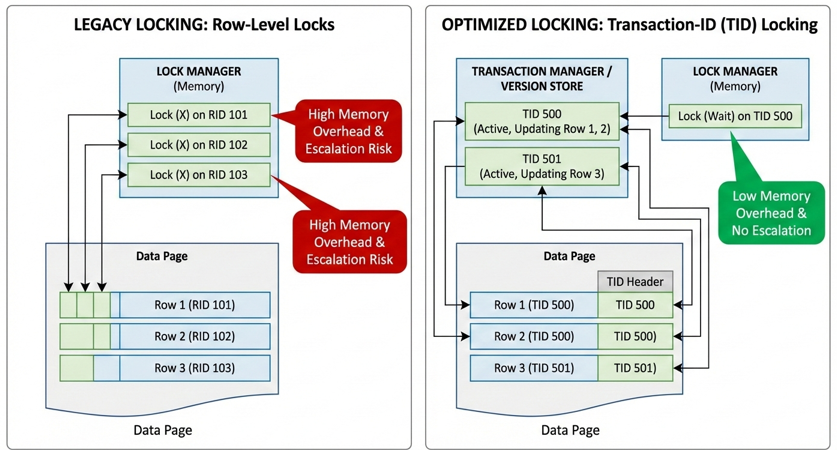
Visualizing the Shift: Legacy Row-Level Locking vs. SQL Server 2025 Transaction ID (TID) Architecture
To truly understand how SQL Server 2025 Optimized Locking eliminates the “scalability wall,” we must look at the structural change in how locks are managed. The following diagram illustrates the contrast between traditional, memory-intensive row-level locking—which often leads to lock escalation and transaction blocking—and the new Transaction ID (TID) locking mechanism.
By leveraging the Accelerated Database Recovery (ADR) framework, Optimized Locking moves the lock resource from the memory-constrained Lock Manager directly into the row header. This visualization highlights how the engine reduces lock memory overhead and maintains high concurrency for high-traffic transactional workloads without the performance penalties of legacy pessimistic locking.
Deep Dive into Lock After Qualification (LAQ)
Lock After Qualification (LAQ) is perhaps the most practical improvement for daily DBA tasks. Consider a query like UPDATE Orders SET Status = 'Processed' WHERE OrderDate < '2024-01-01'.
Practical Scenario: The “Selective” Update
Imagine a table named Orders containing 10 million rows. We need to run a routine cleanup task that updates the status of very old, specific orders.
The Query:
UPDATE Orders
SET Status = 'Processed'
WHERE OrderDate < '2024-01-01'
  AND IsArchived = 0;
In this scenario, let’s assume that out of the 10 million rows, only 50 rows actually meet the criteria.
The “Before” (Legacy SQL Server Locking)
Under the traditional pessimistic model, the SQL Server Storage Engine would perform the following steps:
- Lock Acquisition: As the engine scans the index, it acquires an Update (U) Lock on every single row it evaluates.
- Evaluation: Once the lock is held, the engine checks the
OrderDateandIsArchivedpredicates. - Release or Promote: If the row doesn’t match (which happens 9,999,950 times), it releases the U-lock. If it matches, it promotes it to an Exclusive (X) Lock.
The Consequence: Even though only 50 rows were updated, the engine cycled through 10 million U-locks. This creates massive pressure on the Lock Manager memory, potentially triggers Lock Escalation to a table lock, and blocks any concurrent readers or writers trying to access those pages.
The “After” (SQL Server 2025 with LAQ)
With Optimized Locking enabled, the engine changes its strategy to “Just-in-Time” locking:
- Version Store Lookup: The engine performs a predicate evaluation by looking at the row versions in the Persistent Version Store (PVS). This is a metadata-only check.
- S-Lock Avoidance: Because it hasn’t modified anything yet, it skips the initial U-lock or S-lock entirely for rows that are still being evaluated.
- Targeted Locking: Only when the engine finds one of the 50 rows that actually match the criteria does it reach out to the Lock Manager to acquire a lock on the Transaction ID (TID).
The Result: The Lock Manager only tracks 50 TID locks instead of 10 million row locks.
Key Performance Takeaways
This shift in logic provides three immediate benefits to your production environment:
- Elimination of “False Positive” Blocking: Concurrent transactions can read the other 9,999,950 rows without being blocked by a “U-lock” that was only there for a millisecond while the engine checked a date.
- Drastic Reduction in Memory Pressure: By avoiding the “lock-everything-you-touch” approach, you free up significant Buffer Pool memory that can be used for data caching rather than lock metadata.
- Predictable Execution: Since lock escalation is no longer triggered by the sheer volume of evaluated rows, your batch updates won’t suddenly turn into “Stop the World” table-level events.
Pillar 2: Lock After Qualification (LAQ): Reducing Scanning Contention
The efficiency of Pillar 2 lies in its fundamental shift in the timing of the locking lifecycle. Traditionally, SQL Server followed a ‘Lock-then-Evaluate’ protocol, where an Update (U) or Shared (S) lock was required before the engine could determine if a row matched the query’s filter. This often resulted in massive concurrency bottlenecks during large scans.
With Lock After Qualification (LAQ), the engine utilizes a Version Store lookup (powered by ADR) to perform initial predicate evaluation without acquiring a lock on the data page. By checking the row version first, the engine achieves significant S-Lock avoidance (and U-Lock avoidance) for any row that does not satisfy the WHERE clause. A lock is only promoted to the Transaction ID (TID) once the row is confirmed as a qualification match, ensuring that system resources are only expended on data truly targeted for modification.
LAQ changes the “locking order” of operations. Traditionally, SQL Server acquires a lock before checking if the row matches the WHERE clause.
- Legacy: Lock Row -> Check Criteria -> (If no match) Release Lock.
- LAQ: Check Criteria -> (If match) Lock Row -> Perform Action.
This “lazy” locking ensures that rows which are scanned but not updated never enter the Lock Manager, drastically reducing the “noise” and contention during large scans.
The Lock After Qualification (LAQ) Logic
With LAQ, SQL Server uses the row versions (via ADR) to check the qualification of a row without an initial lock. It only promotes the operation to a full lock once it is certain the row is a target for the transaction. This “Just-in-Time” locking approach effectively eliminates “false positive” blocking where a reader/writer is blocked by a scan that isn’t even going to change the data it is looking at.
Prerequisites and Enabling Optimized Locking
Optimized Locking is not just a “flip a switch” feature for every database. It has specific architectural requirements that you must satisfy first.
1. Accelerated Database Recovery (ADR)
Optimized Locking is built on top of the ADR framework. You cannot have one without the other. ADR ensures that the Version Store is available to handle the TID lookups and LAQ qualification.
2. Enabling the Feature
Once ADR is enabled, you can turn on Optimized Locking at the database level.
-- Step 1: Enable ADR (Prerequisite)
ALTER DATABASE [MyTechMantraDB] SET ACCELERATED_DATABASE_RECOVERY = ON;

-- Step 2: Enable Optimized Locking
ALTER DATABASE [MyTechMantraDB] SET OPTIMIZED_LOCKING = ON;
Note: For more details on setting up ADR, refer to our previous guide on SQL Server 2025 ADR Best Practices at MyTechMantra.com.
Monitoring and Troubleshooting Optimized Locking
As a Senior DBA, your monitoring scripts must evolve to account for TID locking. Traditional scripts that look solely for RID or KEY locks might give you an incomplete picture.
Using sys.dm_tran_locks
The resource_type in this DMV will now show TID. You need to adjust your blocking detection scripts to account for this.
SELECT
    resource_type,
    resource_description,
    request_mode,
    request_status,
    request_session_id
FROM sys.dm_tran_locks
WHERE resource_type = 'TID';
Extended Events (XEvents)
To truly see the benefit of LAQ, use the lock_after_qualification_skipped event. This will show you exactly how many locks were avoided because of the new logic.
Performance Benchmarks: Legacy vs. Optimized
In internal testing on high-concurrency workloads, the results of moving to Optimized Locking are often dramatic.
Swipe left to view more data →
| Metric | Legacy Locking | Optimized Locking | Improvement |
|---|---|---|---|
| Lock Memory Usage | 450 MB | 12 MB | ~97% Reduction |
| Transactions Per Second (TPS) | 1,200 | 2,800 | 2.3x Increase |
| Max Blocking Duration | 4.5 Seconds | 0.2 Seconds | 95% Reduction |
These numbers represent a scenario with 500 concurrent sessions performing mixed SELECT and UPDATE operations on a heavily contested index. The reduction in memory usage allows the SQL Server instance to allocate more RAM to the Buffer Pool, further increasing read performance.
Strategic Recommendations for Senior DBAs
While Optimized Locking is a powerhouse feature, it is important to implement it strategically.
- Target High-Contention Databases first: Start with the databases that currently show high
LCK_M_XorLOCK_HASHwaits. - Audit TempDB: Since Optimized Locking relies on ADR and versioning, ensure your TempDB (or the PVS location) is on high-performance NVMe storage.
- Test with Bulk Loads: Bulk operations behave differently under TID locking. Ensure your ETL windows are tested for performance regressions, though most see improvements.
Conclusion
SQL Server 2025 Optimized Locking represents the most significant advancement in transaction management since the introduction of Snapshot Isolation. By moving from a physical locking model to a logical Transaction ID (TID) model and introducing Lock After Qualification (LAQ), SQL Server has effectively removed the “ceiling” for many high-concurrency applications.
For the modern DBA, mastering these mechanics is no longer optional. It is the key to building scalable, resilient, and lightning-fast database environments. As you plan your migration to SQL Server 2025, Optimized Locking should be at the top of your “Must-Enable” list.
Next Steps
- Evaluate ADR: Check if your current storage can handle the overhead of Accelerated Database Recovery.
- Benchmark: Run a baseline “Load Test” using your current locking configuration.
- Enable Optimized Locking: Use the T-SQL commands provided above on a staging environment.
- Monitor: Use the
sys.dm_tran_locksDMV to observe the shift from RID to TID locks. - Read More: Explore other SQL Server 2025 Performance Tuning articles on MyTechMantra.com to stay ahead of the curve.
Frequently Asked Questions (FAQs) on SQL Server 2025 Optimized Locking
1. How do I enable Optimized Locking in SQL Server 2025 for high-concurrency databases?
To enable Optimized Locking, you must first ensure Accelerated Database Recovery (ADR) is active for the database. Once ADR is enabled, use the command ALTER DATABASE [DatabaseName] SET OPTIMIZED_LOCKING = ON;. This feature is database-scoped, allowing you to target specific high-traffic transactional workloads without affecting the entire instance.
2. What are the prerequisites for using Transaction ID (TID) locking and Lock After Qualification (LAQ)?
The primary prerequisite for SQL Server 2025 Optimized Locking is Accelerated Database Recovery (ADR). Because TID locking and LAQ rely on row-versioning mechanics to check predicates without initial locks, the Persistent Version Store (PVS) must be active. Additionally, your database must be running on the SQL Server 2025 (or higher) compatibility level to utilize the full engine-level optimizations.
3. Does SQL Server 2025 Optimized Locking completely eliminate the need for lock escalation?
While it does not technically “remove” the code path for lock escalation, it significantly reduces the triggers for it. By replacing millions of fine-grained row/page locks with a single TID lock per transaction, the memory pressure on the SQL Server Lock Manager is drastically lowered. Since memory exhaustion is the primary trigger for escalation to table-level locks, Optimized Locking effectively prevents most escalation-related blocking scenarios.
4. How does TID locking improve memory usage compared to traditional row-level locking?
In legacy locking, every row modified requires a separate entry in the lock hash table (approx. 96–128 bytes per lock). In contrast, TID locking stamps the transaction ID directly onto the row header. This moves the locking metadata from expensive RAM (Lock Manager) to the data page itself. For massive UPDATE or DELETE operations, this can result in a 90% or greater reduction in lock memory overhead.
5. Can Optimized Locking be used alongside Read Committed Snapshot Isolation (RCSI)?
Yes, Optimized Locking is fully compatible with and actually enhances Read Committed Snapshot Isolation (RCSI) and Snapshot Isolation. While RCSI reduces reader/writer contention, Optimized Locking focuses on reducing writer/writer contention and the internal engine overhead of managing the locks that RCSI still requires. Together, they provide the most scalable concurrency model available in the SQL Server engine.
6. Which DMVs should I use to monitor transaction blocking when using Optimized Locking?
When monitoring SQL Server 2025 blocking, the traditional sys.dm_tran_locks remains your primary DMV, but you must now filter for the TID resource type. Additionally, use sys.dm_os_waiting_tasks to look for LCK_M_X waits associated with TID resources. For a deeper look at Lock After Qualification (LAQ) efficiency, monitor the Extended Event lock_after_qualification_skipped.
7. What is the impact of Optimized Locking on TempDB and the Persistent Version Store (PVS)?
Since Optimized Locking leverages the ADR framework, it increases the utilization of the Persistent Version Store (PVS). If your PVS is located in TempDB (the default), you may see increased I/O and space usage. For high-throughput environments, it is a DBA best practice to monitor PVS growth and consider placing the version store on dedicated, high-speed NVMe storage to prevent bottlenecks.
 Chetna Bhalla
Add comment