
 Chetna Bhalla
How do I get the row count for all tables in SQL Server?
To get the row count for all tables in a SQL Server database efficiently, query the sys.partitions and sys.tables metadata views. Unlike a traditional SELECT COUNT(*), which performs a slow table scan, this metadata method is nearly instantaneous and does not cause blocking in production environments.
The Performance Dilemma: Why Metadata Wins
In modern database environments, speed is the ultimate currency. Running a standard “SQL Server row count” query using SELECT COUNT(*) on a table with 500 million rows is a perfect recipe for disaster. It triggers a full table scan, spikes I/O, and places shared locks that can stall production applications.
For ETL row count validation in SQL Server, DBAs need a method that is instantaneous and non-blocking. Whether you are troubleshooting a SQL Server 2012 instance or optimizing the latest 2025 release, leveraging system metadata is the fastest way to get row counts for large tables SQL Server environments demand.
The Mechanics of Counting: Scan vs. Metadata
When a developer executes a COUNT(*), the SQL Server engine must physically read every data page or a non-clustered index to verify the existence of every row. In contrast, metadata-driven methods query the System Catalog Views. These views are pre-aggregated and updated by the storage engine in the background during checkpoints and statistics updates. By shifting from data scans to metadata queries, you reduce execution time from minutes to milliseconds.
Method 1: Get Row Count Using sys.partitions (The Gold Standard)
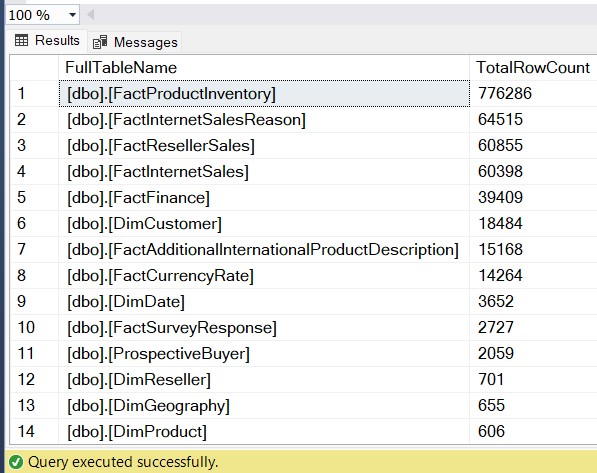
This is widely considered the fastest way to find row count of every table in SQL Server efficiently. It is the “Gold Standard” because every table in SQL Server (from 2012 to 2025) has at least one partition.
T-SQL Script for Metadata Row Counts
-- SQL Server row count script using sys.partitions
-- Optimized for high-performance metadata retrieval
SELECT
    QUOTENAME(SCHEMA_NAME(t.schema_id)) + '.' + QUOTENAME(t.name) AS [FullTableName],
    SUM(p.rows) AS [TotalRowCount]
FROM
    sys.tables t
INNER JOIN
    sys.partitions p ON t.object_id = p.object_id
WHERE
    p.index_id IN (0, 1) -- 0: Heap, 1: Clustered Index
GROUP BY
    t.schema_id, t.name
ORDER BY
    [TotalRowCount] DESC;
Why this works: The sys.partitions view tracks the row count for each heap or clustered index. By summing these rows and filtering for index_id 0 or 1, we avoid double-counting data from non-clustered indexes.
Method 2: High-Precision Row Counts with sys.dm_db_partition_stats
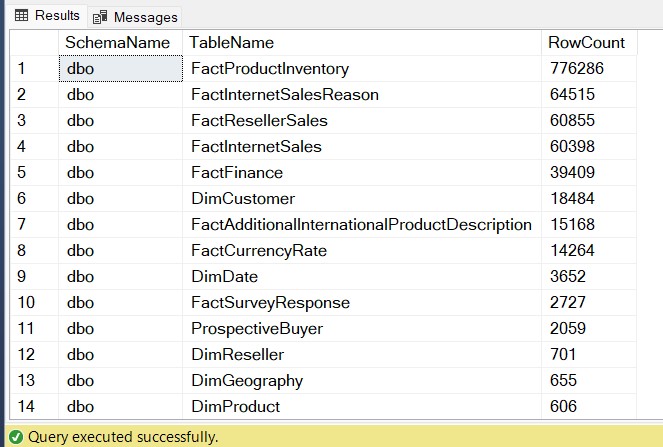
When you are dealing with partitioned tables—common in VLDBs (Very Large Databases)—using SQL Server row count using sys.dm_db_partition_stats provides a more granular look at how data is distributed.
-- Query to list all tables and their row counts in SQL Server
-- Ideal for partitioned environments and ETL validation
SELECT
    s.Name AS SchemaName,
    t.NAME AS TableName,
    SUM(ps.row_count) AS [RowCount]
FROM
    sys.dm_db_partition_stats ps
INNER JOIN
    sys.tables t ON ps.object_id = t.object_id
INNER JOIN
    sys.schemas s ON t.schema_id = s.schema_id
WHERE
    ps.index_id < 2 -- Covers both Heaps and Clustered Indexes
GROUP BY
    s.Name, t.Name
ORDER BY
    [RowCount] DESC;
Usage Tip: This DMV is updated more frequently than some catalog views, making it the preferred choice for real-time monitoring of data ingestion.
Method 3: The Universal Automation (sp_MSforeachtable)
While often considered a legacy approach, performing a SQL Server row count with sp_MSforeachtable is still highly useful for ad-hoc scripts where you need a 100% accurate count and are willing to wait for a scan.
-- SQL Server row count script using sp_MSforeachtable
-- Use with caution on large production databases
DECLARE @RowCountTable TABLE (TableName NVARCHAR(255), RowCnt BIGINT);

INSERT INTO @RowCountTable
EXEC sp_MSforeachtable 'SELECT ''?'', COUNT(*) FROM ?';

SELECT * FROM @RowCountTable ORDER BY RowCnt DESC;
Method 4: Schema-Specific Row Counts using COALESCE
In enterprise environments, you often only care about specific application schemas (e.g., Finance, Logistics). Here is a SQL Server script to count rows for all tables in schema that uses COALESCE to ensure a clean output even if a table is empty.
-- SQL Server row count query with COALESCE
-- Specifically targets organizational schema needs
SELECT
    t.name AS TableName,
    COALESCE(SUM(p.rows), 0) AS RowCounts
FROM
    sys.tables t
INNER JOIN
    sys.partitions p ON t.object_id = p.object_id
WHERE
    p.index_id < 2
    AND SCHEMA_NAME(t.schema_id) = 'Sales' -- Replace with your schema name
GROUP BY
    t.name
ORDER BY
    RowCounts DESC;
Method 5: Using SSMS Standard Reports (No-Code Method)
If you are a manager or a junior DBA who isn’t comfortable running scripts in production, you can still get row counts from all tables in SQL Server using the GUI.
- Open SQL Server Management Studio (SSMS).
- Right-click your target Database.
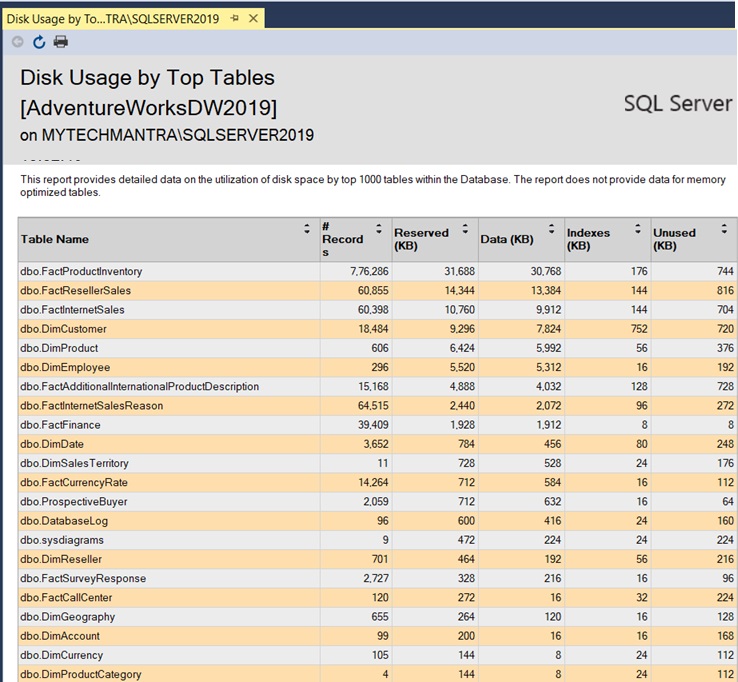
- Navigate to Reports > Standard Reports > Disk Usage by Top Tables.
This report provides a visual breakdown of row counts alongside reserved space, making it easy to spot “bloated” tables at a glance.
Method 6: Legacy Compatibility (sysindexes)
For maintaining older legacy systems where newer DMVs might not be available, querying sysindexes remains a reliable fallback for a SQL Server table row count.
-- Legacy compatible row count query
SELECT
    o.name AS TableName,
    i.rowcnt AS [RowCount]
FROM
    sysindexes i
INNER JOIN
    sysobjects o ON i.id = o.id
WHERE
    i.indid < 2 AND OBJECTPROPERTY(o.id, 'IsUserTable') = 1
ORDER BY
    i.rowcnt DESC;
Case Study: Optimizing ETL Validation for a 4TB Data Warehouse
To demonstrate the power of metadata-based counting, let’s look at a real-world scenario from a MyTechMantra consulting project.
The Challenge: A retail client had an ETL process that migrated 4 terabytes of data nightly. The final step was a “Row Count Reconciliation” to ensure source and destination parity. Their original script used a cursor and SELECT COUNT(*).
- Original Script Execution Time: 42 minutes.
- The Problem: The count was so slow it delayed the morning reporting window.
The Solution: We implemented the sys.partitions row count method (Method 1).
- Result: The reconciliation time dropped from 42 minutes to 1.2 seconds.
- Why it worked: By reading metadata instead of scanning data pages, the script avoided millions of physical reads.
Lesson Learned: For high-speed data environments, SQL Server get row count without select count(*) is not just an optimization; it’s a necessity.
Choosing the Right Method: A Comparative Matrix
Compare the performance, accuracy, and locking risks of six different SQL Server row-counting techniques to identify the most efficient method for your database auditing and ETL validation needs.
| Method | Speed | Accuracy | Locking Risk | Best For | Technical Level |
|---|---|---|---|---|---|
| 1. sys.partitions | Instant | 99% – 100% | Zero | Large Production DBs | Intermediate |
| 2. DMVs (sys.dm_db_…) | Near-Instant | High | Minimal | Partitioned Environments | Advanced |
| 3. sp_MSforeachtable | Slow | 100% | High | Small DBs / Audits | Intermediate |
| 4. Schema Filter | Instant | High | Zero | Multi-tenant / Org Apps | Intermediate |
| 5. SSMS Reports | Instant | High | Zero | Managers / Junior DBAs | Beginner |
| 6. Legacy sysindexes | Fast | High | Zero | SQL 2000-2008 / Legacy | Intermediate |
Conclusion
Managing data at scale requires shifting from traditional COUNT(*) scans to high-performance metadata retrieval. By utilizing the sys.partitions row count or sys.dm_db_partition_stats methods, DBAs can perform ETL row count validation in SQL Server without impacting production performance. Whether you are auditing a legacy SQL Server 2012 instance or the latest 2025 release, these scripts ensure that you get the fastest way to get row counts for large tables in SQL Server with minimal overhead.
Next Steps & Further Reading
If you found this guide helpful, explore these related tutorials on MyTechMantra.com to further optimize your SQL Server environment:
- Advanced Indexing: How to Identify and Remove Unused Indexes in SQL Server — Clean up your database after identifying large, high-row-count tables.
- Performance Monitoring: Top 10 DMV Queries for SQL Server Performance Tuning — Master the system views every DBA should know.
- Automation: How to Schedule SQL Server Agent Jobs for Database Audits — Automate your row count reports to be sent via email daily.
- Database Growth: Track Table Growth Over Time with a Custom History Table — Go beyond current row counts and start forecasting your storage needs.
- Maintenance: A Complete Guide to Updating SQL Server Statistics — Ensure your metadata row counts remain 100% accurate.
Frequently Asked Questions (FAQs)
How to find row count of every table in SQL Server efficiently?
The most efficient way is to query the sys.partitions system view. This avoids the cost of a full table scan and returns data from the engine’s internal tracking tables nearly instantaneously, which is ideal for large-scale environments.
Is it possible to get a SQL Server row count without SELECT COUNT(*)?
Yes. By using the get row count using sys.partitions or the sys.dm_db_partition_stats DMV method, you can retrieve the count directly from metadata. This bypasses the heavy I/O and locking issues associated with full table scans.
Why does the metadata count sometimes differ from a physical count?
Metadata counts are generally accurate but are updated during checkpoints or when statistics are updated. If your database has high-volume, uncommitted transactions, the metadata might lag by a few rows. You can resolve this by running UPDATE STATISTICS [TableName].
Does this work on Azure SQL Database?
Yes. All metadata-driven scripts mentioned here are 100% compatible with Azure SQL Database, Azure SQL Managed Instance, and all versions of SQL Server 2012+ on-premises.
What is the fastest way to get row counts for large tables in SQL Server?
The fastest method for multi-billion row tables is querying sys.partitions. Because this method reads the “row_count” value already stored in the database’s distribution maps, it returns results in milliseconds without reading a single row of user data.
How do I perform an ETL row count validation in SQL Server?
For ETL reconciliation, use the sys.dm_db_partition_stats DMV. It provides a reliable, non-blocking snapshot of data movement, allowing you to verify that the row counts in your destination staging tables match your source system during the loading process.
Can I get a SQL Server row count script for a specific schema?
Yes. You can use a SQL Server script to count rows for all tables in a schema by joining sys.tables with sys.schemas and applying a WHERE filter. This is highly effective for auditing specific application modules like ‘Sales’ or ‘HR’.
Is there a query to list all tables and their row counts in SQL Server with formatting?
Yes, by using the QUOTENAME function and joining metadata views, you can generate a clean query to list all tables and their row counts in SQL Server. This is often used for generating database health reports and documentation.
How do I get row counts from all tables in SQL Server using the GUI?
If you prefer not to use T-SQL, you can use the built-in Standard Reports in SSMS. Right-click your database, select Reports > Standard Reports > Disk Usage by Top Tables. This provides a visual summary of row counts and storage allocation.
 Ashish Kumar Mehta
Add comment