
 Ashish Kumar Mehta
How do I get the row count for all tables in PostgreSQL?
The fastest way to retrieve an estimated row count for all tables in PostgreSQL is by querying the pg_class system catalog or the pg_stat_user_tables view. These methods provide near-instant results by reading database metadata, avoiding the heavy I/O costs of a SELECT COUNT(*) sequential scan on large production datasets.
In PostgreSQL, finding the row count isn’t as simple as it is in other systems due to MVCC (Multi-Version Concurrency Control). While a SELECT COUNT(*) is the most accurate, it is often the slowest.
For large-scale production databases, you need methods that balance speed and precision. Here is your definitive guide to getting row counts efficiently.
Why is SELECT COUNT(*) Slow in PostgreSQL?
Unlike some engines that store a global counter, PostgreSQL must perform a Sequential Scan to verify which row versions are “visible” to your current transaction. On tables with millions of rows, this results in high I/O and CPU usage. To scale, we must look at Metadata and Statistics.
Method 1: The Instant Metadata Estimate (pg_class)
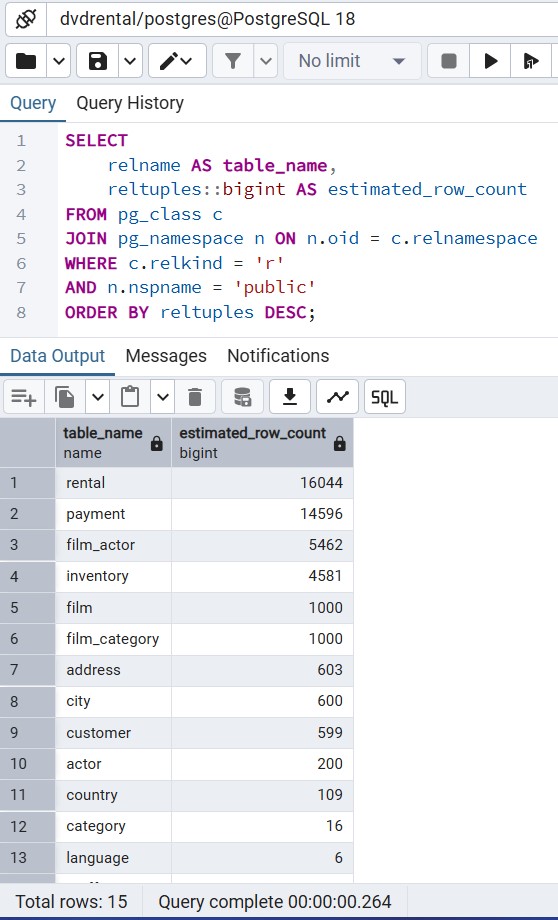
This is the fastest method possible. It reads from the pg_class system catalog, which tracks the estimated number of tuples (reltuples).
SELECT
    relname AS table_name,
    reltuples::bigint AS estimated_row_count
FROM pg_class c
JOIN pg_namespace n ON n.oid = c.relnamespace
WHERE c.relkind = 'r'
AND n.nspname = 'public'
ORDER BY reltuples DESC;
Best for: Quick audits of massive databases where a 1–2% margin of error is acceptable.
Method 2: Precise Row Counts for All Tables (The “Loop” Script)
If you need 100% accuracy across every table in a schema, use this original PL/pgSQL dynamic script. It iterates through your tables and performs a real count, presenting the data in a clean, unified result set.
/* MyTechMantra.com - Precise PostgreSQL Table Counter
   Description: Iterates through all tables in the specified schema
   and performs an accurate count.
*/

DO $$
DECLARE
    row_record RECORD;
    table_full_name TEXT;
    current_count BIGINT;
BEGIN
    -- Create temporary storage for results
    CREATE TEMP TABLE IF NOT EXISTS mytechmantra_row_results (
        schema_name TEXT,
        table_name TEXT,
        accurate_count BIGINT,
        generated_at TIMESTAMP DEFAULT NOW()
    ) ON COMMIT DROP;

    -- Loop through public user tables
    FOR row_record IN
        SELECT schemaname, tablename
        FROM pg_catalog.pg_tables
        WHERE schemaname = 'public' -- Filter for your target schema
    LOOP
        table_full_name := quote_ident(row_record.schemaname) || '.' || quote_ident(row_record.tablename);

        EXECUTE format('SELECT count(*) FROM %s', table_full_name)
        INTO current_count;

        INSERT INTO mytechmantra_row_results (schema_name, table_name, accurate_count)
        VALUES (row_record.schemaname, row_record.tablename, current_count);
    END LOOP;
END $$;

-- Display final results sorted by table size
SELECT schema_name, table_name, accurate_count
FROM mytechmantra_row_results
ORDER BY accurate_count DESC;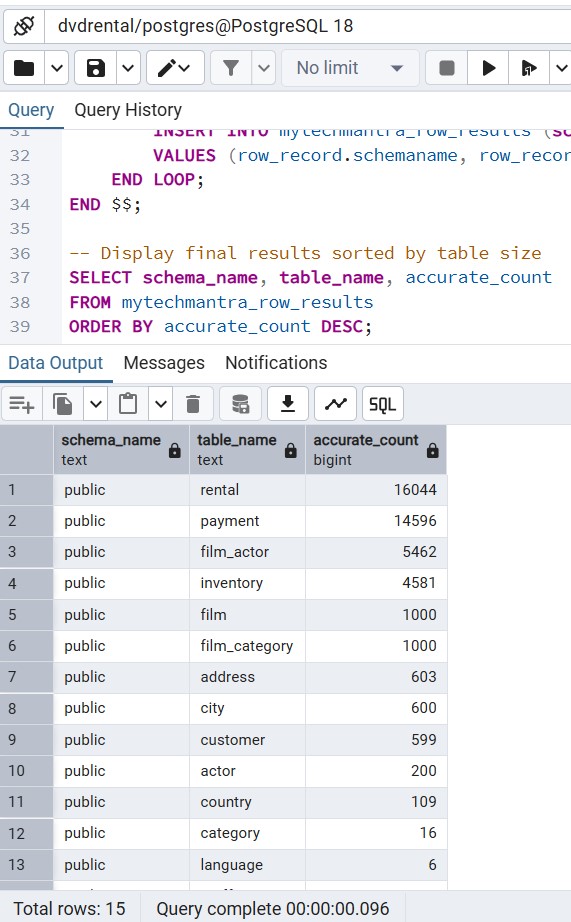
Method 3: Using pg_stat_user_tables for Live Tuples
PostgreSQL’s statistics collector tracks “live” vs “dead” tuples. This is vital for understanding Table Bloat.
SELECT
    schemaname,
    relname,
    n_live_tup AS live_rows,
    n_dead_tup AS dead_rows
FROM pg_stat_user_tables;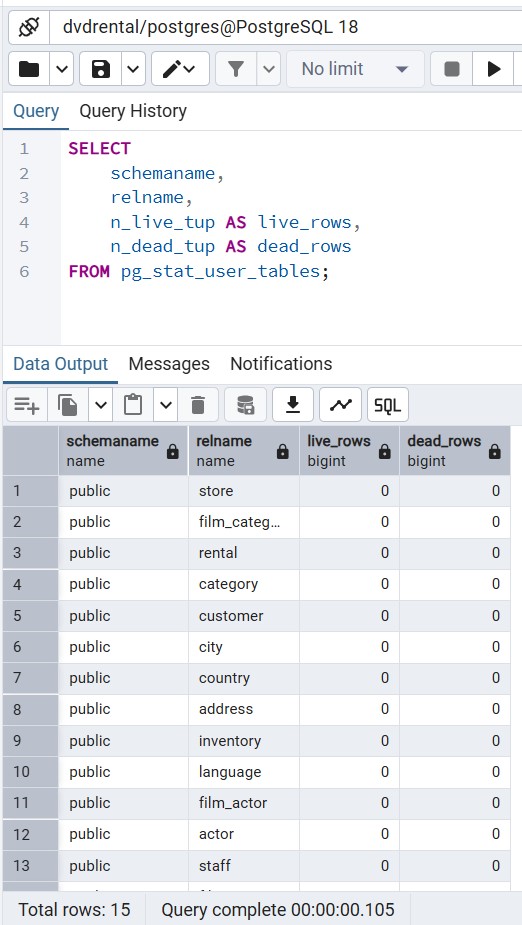
Comparative Matrix: Performance vs. Accuracy
This matrix compares PostgreSQL row count metadata (pg_class) for instant results with zero server load, against dynamic COUNT(*) scans that provide 100% precision. Choose the best method for your Postgres performance tuning or financial-grade DBA reporting.
| Method | Speed | Accuracy | Production Impact |
|---|---|---|---|
| SELECT COUNT(*) | Very Slow | 100% | High (I/O Heavy) |
| pg_class Metadata | Instant | ~99% | Zero |
| pg_stat_user_tables | Instant | ~98% | Zero |
| PL/pgSQL Loop | Slow | 100% | Medium |
Conclusion
In PostgreSQL, the “standard” way (COUNT(*)) is rarely the “best” way for large-scale environments. By leveraging system catalogs like pg_class and statistics views like pg_stat_user_tables, DBAs and Developers can obtain the insights they need without compromising database performance. For those rare moments where 100% precision is required, the dynamic PL/pgSQL script provided above offers a structured, automated solution.
Next Steps
To further master PostgreSQL performance and administration, we recommend exploring these essential follow-up guides. Building a deep understanding of these core topics is the “Mantra” for any successful DBA or Developer.
- PostgreSQL Vacuum & Analyze: A DBA’s Guide to Health: Learn how to keep your metadata accurate. This guide explains how to automate statistics updates so your
pg_classrow counts remain reliable. - Indexing Strategies: PostgreSQL B-Tree vs. GIN vs. GiST: A must-read for developers. Discover which index type to use for full-text search, arrays, and standard relational data to speed up your queries.
- SQL Server to PostgreSQL Migration: Mapping Data Types & Functions: Moving from MSSQL? This cross-platform guide maps T-SQL concepts to their PostgreSQL equivalents, making your transition seamless.
- PostgreSQL Bloat Management: Finding and Fixing Dead Tuples: Building on our row count methods, this article shows you how to identify “dead air” in your tables and reclaim disk space without downtime.
Frequently Asked Questions (FAQs)
1. Why does my PostgreSQL row count differ from the actual count?
Metadata counts (reltuples) are updated during VACUUM or ANALYZE operations. If your table has had massive inserts since the last analyze, the metadata will lag.
2. How do I force PostgreSQL to update its row count metadata?
Run ANALYZE [table_name];. This updates the system statistics without locking the table for writes, making your metadata queries much more accurate.
3. Does SELECT COUNT(1) perform better than SELECT COUNT(*)?
No. In PostgreSQL, COUNT(1) and COUNT(*) are functionally identical. Both trigger a full scan of the table or index.
4. Can I get a row count from a PostgreSQL index?
Yes, if the index is smaller than the heap, PostgreSQL may perform an Index Only Scan, which is faster but still O(N).
5. How to get row counts for all tables in a specific schema?
Modify the WHERE clause in Method 1 or 2 to filter by nspname or schemaname.
6. What is the impact of table bloat on row counting?
High bloat (too many dead tuples) makes SELECT COUNT(*) significantly slower because the engine must skip over dead row versions.
7. Is there a way to see row counts in pgAdmin 4?
Yes. Select a table in the browser tree and click the Statistics tab. It pulls data directly from the pg_stat views.
 Chetna Bhalla
Add comment