
 Ashish Kumar Mehta
- Discover this step‑by‑step beginner’s guide to easily install PostgreSQL on Windows 11.
- Need to run PostgreSQL from anywhere? Add PostgreSQL to PATH on Windows with this quick guide
- Learn How to Connect to PostgreSQL Database Server Using psql and pgAdmin.
Introduction
If you’re searching for a PostgreSQL tutorial for beginners, one of the best ways to start is by working with a real dataset. One of the easiest ways to start writing SQL queries is by loading a PostgreSQL sample database into your system. The DVD Rental sample database is widely used for learning because it mirrors a real-world video rental store. In this guide, you’ll learn step by step how to restore PostgreSQL database files using pgAdmin, so you can practice SQL queries with confidence. This guide walks you through the process of how to add PostgreSQL to PATH on Windows, making your database setup more efficient and user‑friendly. Learn How to Connect to PostgreSQL Database Server Using psql and pgAdmin.
What is pgAdmin?
pgAdmin is a powerful, web-based PostgreSQL GUI tool that makes database management simple. Instead of relying on command-line operations, beginners can use pgAdmin to create databases, run queries, and restore PostgreSQL database backups with just a few clicks.
Why Use the DVD Rental Sample Database?
The DVD Rental sample database is perfect for anyone following a PostgreSQL tutorial for beginners. It includes tables for films, customers, rentals, and payments, allowing you to:
- Practice SQL queries in PostgreSQL
- Explore schemas and relationships
- Understand joins and foreign keys
- Learn how to restore PostgreSQL database files for hands-on experience
Prerequisites to load the PostgreSQL dvdrental Sample Database
Before you begin, ensure you have:
- A working PostgreSQL server installed (This article includes a step-by-step guide on how to install PostgreSQL on Windows).
- The dvdrental sample database file (usually provided in .tar format).
- Access to pgAdmin or the psql command‑line tool.
Download the dvdrental Sample Database
- Visit the official PostgreSQL sample databases page.
- Download the dvdrental.tar file.
- Save it to a convenient location on your computer (e.g., Downloads folder).
Step-by-Step: Load PostgreSQL Sample Database Using pgAdmin
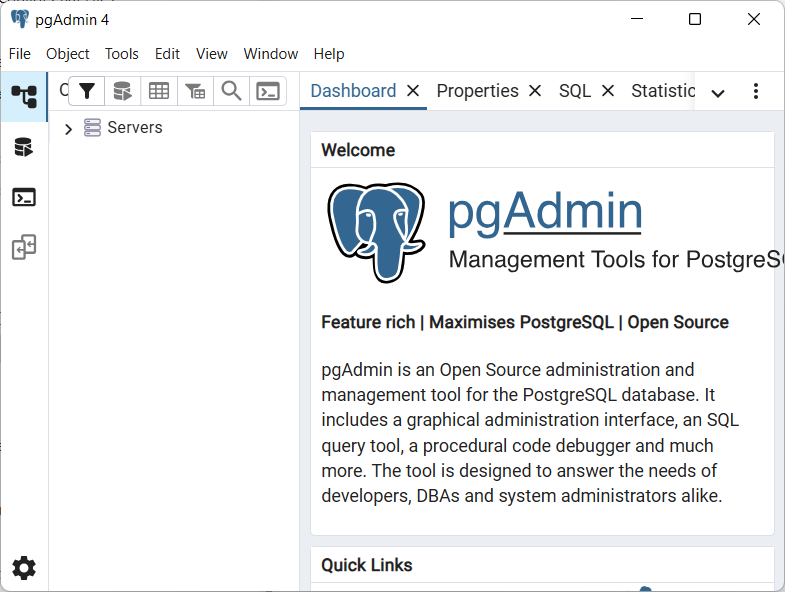
Step 1. Launch pgAdmin and Connect
Open pgAdmin and connect to your PostgreSQL server. This is the first step in any PostgreSQL tutorial for beginners.
Step 2. Create a New Database
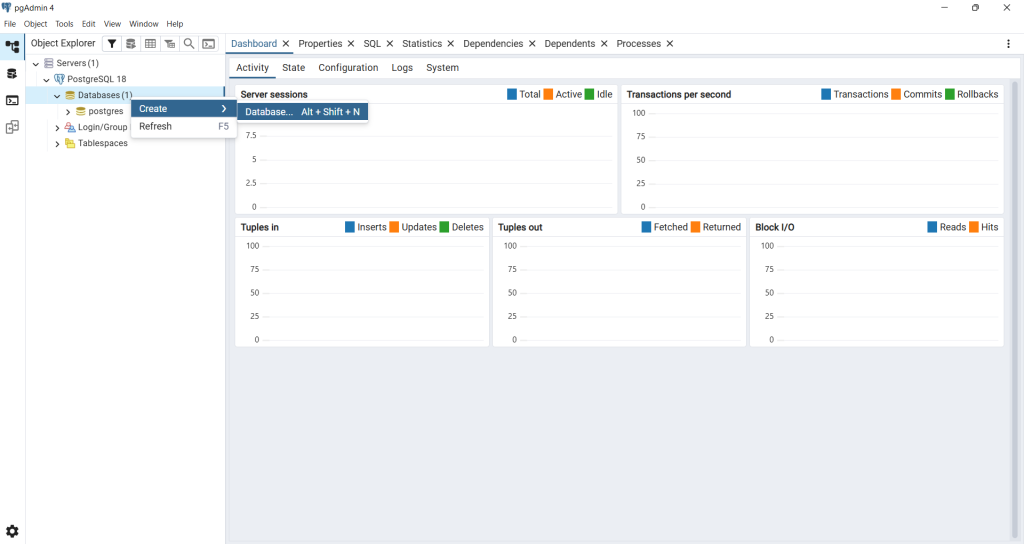
- Right-click on Databases in the object browser.
- Select Create → Database.
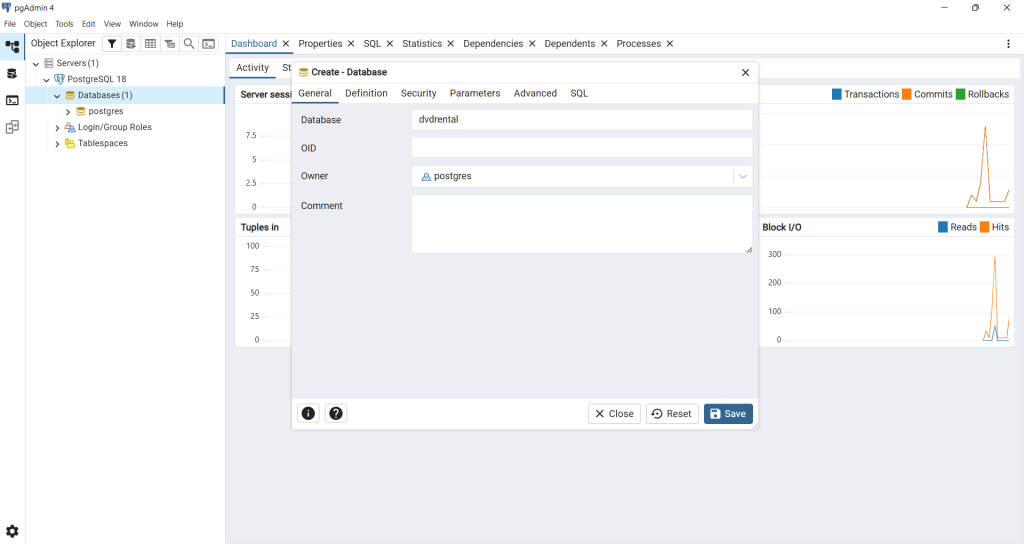
- Name it dvdrental.
- Click Save. You now have an empty database ready for restoration.
Step 3. Restore PostgreSQL Database Backup
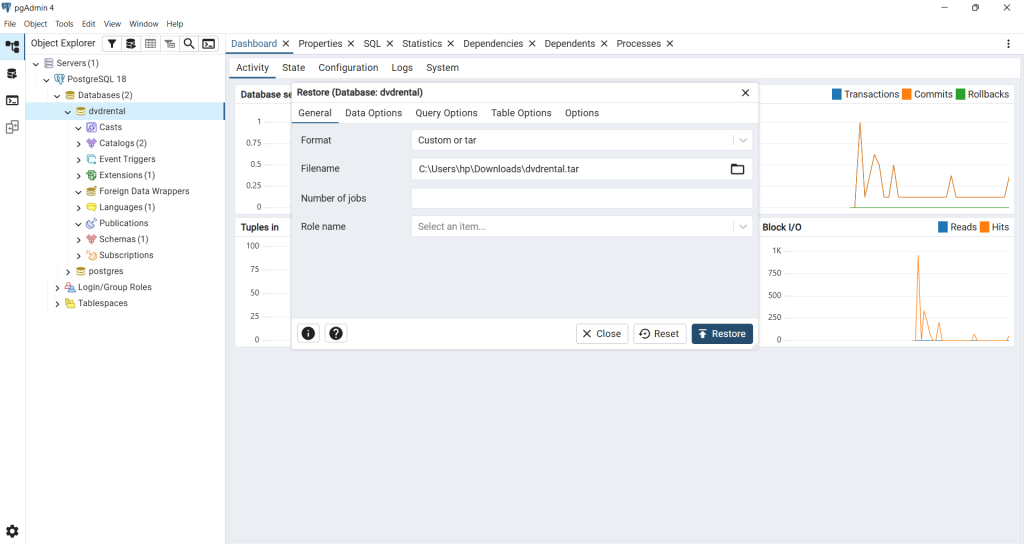
- Right-click on the dvdrental database.
- Choose Restore.
- Enter the path to the sample file (e.g., C:\sampledb\dvdrental.tar).
- Click Restore to begin.
This step demonstrates how to restore PostgreSQL database backups using pgAdmin.

Step 4. Verify the Restoration
Once complete, expand the dvdrental database. You’ll see tables under the public schema, along with views, functions, and other objects. This confirms that the PostgreSQL sample database has been successfully restored.

Exploring the DVD Rental Database
Key tables include:
- film – movie details
- customer – customer records
- rental – rental transactions
- payment – payment history
Exploring these tables is a core part of any PostgreSQL tutorial for beginners.
Conclusion
Loading the PostgreSQL DVD Rental sample database with pgAdmin is one of the easiest ways to practice SQL. By learning how to restore PostgreSQL database backups, beginners gain hands-on experience with schemas, queries, and relationships. This tutorial is a solid foundation for anyone starting their journey with PostgreSQL.
🚀 Now that your sample data is loaded, it’s time to start querying! Master the PostgreSQL SELECT Clause with this high-performance querying masterclass to learn how to retrieve and analyze your data like a pro.
Frequently Asked Questions About Loading PostgreSQL Sample Database
Question 1: How do I restore PostgreSQL database using pgAdmin? Answer: To restore a PostgreSQL database in pgAdmin, right-click on the target database, select Restore, provide the path to your backup file (e.g., dvdrental.tar), and click Restore. This process loads the sample data into PostgreSQL.
Question 2: What is the PostgreSQL DVD Rental sample database? Answer: The DVD Rental sample database is a prebuilt dataset that simulates a video rental store. It includes tables for films, customers, rentals, and payments, making it ideal for practicing SQL queries in PostgreSQL.
Question 3: Is this PostgreSQL tutorial for beginners? Answer: Yes, this guide is designed as a PostgreSQL tutorial for beginners, walking you step by step through creating a database, restoring backups, and exploring tables using pgAdmin.
Q4: Why should I use pgAdmin instead of the command line? Answer: pgAdmin is a beginner-friendly GUI tool for PostgreSQL. It simplifies tasks like creating databases, running queries, and restoring backups, making it perfect for those new to PostgreSQL.
Q5: Can I practice SQL queries after loading the sample database? Answer: Absolutely. Once you restore PostgreSQL database files like the DVD Rental dataset, you can run queries, explore schemas, and learn joins, foreign keys, and relationships in PostgreSQL.
More PostgreSQL Articles and Tips
- Install PostgreSQL on Windows: Step‑by‑Step Beginner’s GuideLearn how to install PostgreSQL on Windows with this beginner friendly tutorial. Step by step instructions for downloading, configuring, and setting up PostgreSQL, pgAdmin, and command line tools.
- Add PostgreSQL to PATH on Windows (Step-by-Step Guide)Learn step by step how to set Windows PATH for Postgres tools. Easily add PostgreSQL to PATH Windows 11, configure PostgreSQL environment variables Windows, and run Postgres from the command line.
- Connect to PostgreSQL Database Server Using psql and pgAdminLearn how to connect to PostgreSQL database server using psql command line and pgAdmin GUI. Easy tutorial for beginners with queries, host/port setup, and FAQs.
- Load PostgreSQL Sample Database: Beginner-Friendly TutorialLearn how to load the PostgreSQL DVD Rental sample database using pgAdmin. Step-by-step beginner’s guide to creating, restoring, and exploring PostgreSQL databases for practice.
- PostgreSQL SELECT Clause: The Complete Guide (with Performance Tips)Master the PostgreSQL SELECT statement with this beginner-friendly tutorial. Learn syntax, examples, and best practices for querying data efficiently.
 Chetna Bhalla
Add comment